- Used Computers Monitors Deals
- sku: 14494816167183813
- MICROSOFT 100-0027
100-0027 MICROSOFT Perspective Pixel Lcd Multitouch Display
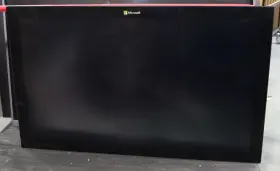
| Brand | MICROSOFT |
|---|---|
| Manufacturer Part Number | 100-0027 |
| Part Type | LCD DISPLAY |
| Screen Size | 55 IN |
Review MICROSOFT Perspective Pixel Inch Lcd Multitouch Display
The Microsoft 100-0027 Perspective Pixel LCD Multitouch Display is an innovative and high-performance touchscreen monitor designed for use with Surface Hub 2S and other compatible devices. This sleek and modern display boasts a stunning 50.5-inch diagonal size with a 3:2 aspect ratio, providing ample space for collaboration, presentations, and multitasking.
With a resolution of 1920 x 1080 pixels, the Perspective Pixel LCD Multitouch Display delivers crisp and clear visuals, making it perfect for displaying graphics, videos, and text. The multitouch capability supports up to 20 points of touch, enabling multiple users to interact with the display simultaneously, making brainstorming sessions, design reviews, and group projects more productive and engaging.
The Perspective Pixel LCD Multitouch Display features a unique, adjustable stand design that allows the display to tilt from 25 to 70 degrees, as well as rotate 90 degrees into portrait mode. This flexibility makes it an ideal solution for various environments, including conference rooms, classrooms, and open office spaces.
Additionally, the display comes with built-in sensors that automatically adjust the brightness and orientation based on ambient lighting and room conditions, ensuring optimal visual comfort and energy efficiency. The Perspective Pixel LCD Multitouch Display is also compatible with Microsoft Whiteboard, allowing users to write, draw, and collaborate in real-time, making it an essential tool for teamwork and creativity.
In summary, the Microsoft 100-0027 Perspective Pixel LCD Multitouch Display is a versatile and powerful touchscreen monitor that offers a large, high-resolution canvas for collaboration, multitasking, and creativity. Its adjustable stand design, multitouch capabilities, and built-in sensors make it a valuable addition to any modern workspace.
buying a Microsoft Perspective Pixel LCD Multitouch Display (Model 100-0027) can be a good investment for certain users, especially those who require a high-quality, interactive display for their work or home setup. Here are some potential pros and cons to consider before making a decision:
Pros:1. Superior touch and pen input: The Microsoft Perspective Pixel display offers a high-precision multitouch and pen input experience, making it an ideal choice for graphic designers, architects, engineers, and other professionals who rely on precise input for their work.
2. Slim and sleek design: This display boasts a modern, sleek design with a thin bezel, which can help save desk space and make for a more aesthetically pleasing setup.
3. Wide viewing angles: The LCD panel provides excellent viewing angles, ensuring that the display looks good from various angles and distances.
4. Compatibility with popular software: Microsoft's display is designed to work seamlessly with popular software like Adobe Creative Suite, AutoCAD, and Microsoft Office, among others.
5. Built-in speakers: The display comes with integrated speakers, which can be convenient for users who don't want to rely on external speakers or headphones.
Cons:1. High price point: The Microsoft Perspective Pixel LCD Multitouch Display is a premium product, and its price tag may be a barrier for some potential buyers.
2. Limited connectivity options: The display offers limited connectivity options, with only one USB-B and one USB-A port, which may not be sufficient for users who require more ports for their peripherals.
3. No built-in stand: The display does not come with a built-in stand, which means users will need to purchase a separate mount or stand to use the display effectively.
4. Power consumption: The Perspective Pixel display consumes more power than some standard monitors, which may lead to higher energy bills for some users.
In conclusion, the Microsoft Perspective Pixel LCD Multitouch Display offers several advantages for users who require a high-precision, interactive display for their work or creative projects. However, its premium price, limited connectivity options, and lack of a built-in stand may be drawbacks for some buyers. Ultimately, the decision to purchase this display depends on the user's specific needs and budget.
If you are a professional who requires a high-precision, interactive display for graphic design, engineering, or architectural work, and you have the budget for it, the Microsoft Perspective Pixel LCD Multitouch Display could be an excellent investment. However, if you are on a tighter budget or don't require the advanced touch and pen input capabilities, there may be more affordable alternatives that would better suit your needs.
Details:
Physical condition: fair. Touchscreen: yes. Parts not included: software, user guide, accessory cables, remote, stand. 1x Microsoft perspective pixel 55 lcd multitouch display.
Working condition: good. Max resolution: 1920 x 1080. Active screen size: 55. The actual item is shown in the photos.
Inputs: div x2.: tested to power on and display an image.: product condition.
Minor scratches and scuffs on casing.
specifications monitorpug:
- brand: Microsoft
- mpn: 100-0027
- part type: Lcd Display
- screen size: 55 In
seller monitorpug:
- # reviews: 41414
- rating: 99.7%
- city: bell, california
general monitorpug:
- category: Computers > Computers/tablets Networking > Monitors, Projectors Accs
payments monitorpug:
- wallet: google-pay
- other
- credit card: visa
returns monitorpug:
- method: money back
- time: 60 days
- paid by: buyer
- policy: returns accepted
offer monitorpug:
- options: seller-arranged-local-pickup
- in stock #: 2
- sold #: 8
- availability: in stock
- prices: $149.99–$997.00
- item condition: Used
- best offers: true
- started: may 29, 2026
shipping monitorpug:
Similar Items:
- Microsoft 1843 Surface Hub 3 50 Inch 3840 X 2560 Display Parts Repair La Pickup Resolution: 3840 x 2560. Has touchscreen: yes; untested. Working condition: as-is.: has moderate cosmetic damage on the chassis. Back light: UPS lcd anti-flare. Parts not included: software, user guide, accessory cables, remote, stand, power cable, surface hub 3 pack, smart camera, pens.: product ...(July 11th, 2024)
- Microsoft Vy7-00001 Surface Hub 3 85-inch 4k Ips Lcd Commercial Monitor At the heart of hub 3 is a powerful intel core i5 processor and 32 GB ram, ensuring smooth multitasking efficient performance across all business applications. Includes a manufacturer warranty. Storage needs are well catered to with a 512 GB sad, providing quick access files and applications. ...(May 12th, 2025)
- Viewsonic Mrc1010-tn 10.1 Inch Touch Console Certified For Microsoft Teams Rooms Instant collaboration: the MRC1010-TN touch console detects human presence and wakes up the Microsoft teams rooms certified solution kit as soon someone enters room, enabling meetings to start without delay. Intuitive controls allow users to start, join, or end meetings with one touch, and provide ...(May 19th, 2025)
- Microsoft Vxv-00001 New Surface Hub 3 50 Inch 4k Ultra Hd Touchscreen Monitor Please reference part number for specs. With its stunning led widescreen display featuring pixel sense and anti-glare technology, it delivers exceptional visual clarity touch responsiveness for engaging presentations discussions. At the heart of hub 3 is a powerful intel core i5 processor and 32 GB ...(December 28th, 2025)
- Microsoft Vxz-00001 Surface Hub 3 For Business 50 Inch 4k Ips I5 32gb 512gb Taa Surface hub camera the included 12MP is the link that makes hybrid collaboration possible, letting remote workers realistically see their colleagues with 4k resolution and a wide 136 horizontal fob. Video TV tuner no. Portrait mode exclusive to the 50 surface hub 3 is mode, which allows you ...(March 21st, 2026)
