- Used Computers Monitors Deals
- sku: 11691483556265772
- LG 24BA550
24BA550 LG Ips Monitor
| Brand | LG |
|---|---|
| Manufacturer Part Number | 24BA550 |
| Part Type | MONITOR |
| Screen Size | 24 IN |
| Brightness | 250 CD/M |
| Ec Range | A G |
| Response Time | 5 MS |
| Refresh Rate | 100 HZ |
| Video Inputs | HDMI STANDARD |
| Color | BLACK |
| Most Suitable For | CASUAL COMPUTING |
| Aspect Ratio | 16 |
| Unit Type | UNIT |
| Display Type | IPS LCD |
| Manufacturer Warranty | 1 YEAR |
| Maximum Resolution | 1920 X 1080 |
| Product Line | LG IPS |
Review LG Inch Ips 100hz Monitor
The LG 24BA550-W UltraGear monitor is a 24-inch powerhouse designed for gamers and professionals seeking high-performance visuals. With a sleek and modern design, this IPS panel boasts a Full HD (1920 x 1080) resolution, ensuring crisp and clear images.
The monitor's most notable feature is its 100Hz refresh rate, which reduces lag and provides smoother visuals, especially during fast-paced gaming scenes. The IPS (In-Plane Switching) technology guarantees wide viewing angles (178 degrees horizontally and vertically) and vibrant colors, making it an excellent choice for multitasking or collaborative workspaces.
The LG 24BA550-W UltraGear monitor supports a wide color gamut, including 99% sRGB and 72% NTSC, ensuring accurate and true-to-life color representation. The monitor also comes with a 5ms response time, which minimizes motion blur and ghosting, ensuring a seamless visual experience.
Additionally, this monitor features multiple connectivity options, including HDMI, DisplayPort, and D-Sub, allowing users to easily connect multiple devices. The monitor's stand offers height adjustability, making it comfortable and ergonomic for various users.
The LG 24BA550-W UltraGear monitor also comes with various features to enhance the user experience, including Black Stabilizer, which enhances visibility in dark scenes, and DAS mode, which optimizes the display for split-screen viewing.
In summary, the LG 24BA550-W UltraGear monitor is an excellent choice for gamers and professionals seeking high-performance visuals, wide viewing angles, accurate colors, and a responsive display. Its sleek design, connectivity options, and ergonomic stand make it a versatile and practical addition to any workspace.
The LG 24BA550 is a 24-inch IPS (In-Plane Switching) monitor with a 1920 x 1080 resolution and a 100Hz refresh rate. This monitor offers several advantages and disadvantages for users, depending on their specific needs and preferences.
Advantages:1. IPS Technology: IPS panels provide excellent color accuracy and viewing angles, making this monitor ideal for graphic designers, photographers, and gamers who need true-to-life colors.
2. 100Hz Refresh Rate: A higher refresh rate reduces motion blur and input lag, providing a smoother visual experience for gamers and video editors.
3. Slim Design: The sleek, minimalist design of the LG 24BA550 can complement any home or office setup.
4. Energy Efficient: This monitor has a low power consumption rating, making it a cost-effective option for those concerned about energy usage.
Disadvantages:1. Limited Resolution: While the 1080p resolution is sufficient for most applications, it may be insufficient for those who require higher pixel densities for multitasking or working with large files.
2. No Adjustable Stand: The monitor does not have an adjustable stand, which may limit its ergonomic flexibility for some users.
3. Limited Connectivity: The LG 24BA550 has only one HDMI port, making it less convenient for users who require multiple display connections.
In conclusion, the LG 24BA550 offers excellent color accuracy and a fast refresh rate for a reasonable price. While it may lack some advanced features like adjustable stands and multiple connectivity options, its slim design, energy efficiency, and compatibility with various applications make it a solid choice for users who prioritize color accuracy and smooth visual experiences.
Based on the advantages and disadvantages discussed above, we recommend the LG 24BA550 for users who require a high-quality, color-accurate monitor with a fast refresh rate for gaming or graphic design purposes. However, those who require advanced ergonomics or multiple display connections should consider other options.
Details:
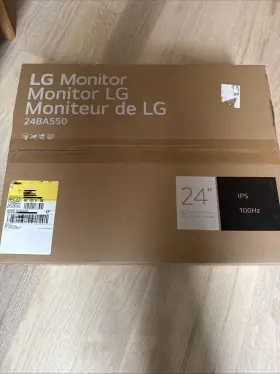
Already had one but work sent an extra anyway so have no use for it. Never opened Lg 24 monitor.
specifications monitorpug:
- brand: Lg
- mpn: 24ba550
- part type: Monitor
- screen size: 24 In
- brightness: 250 Cd/m
- ec range: A G
- response time: 5 Ms
- refresh rate: 100 Hz
- video inputs: Hdmi Standard
- color: Black
- most suitable for: Casual Computing
- aspect ratio: 16
- unit type: Unit
- display type: Ips Lcd
- manufacturer warranty: 1 Year
- maximum resolution: 1920 X 1080
- product line: Lg Ips
general monitorpug:
- category: Computers > Computers/tablets Networking > Monitors, Projectors Accs
seller monitorpug:
- # reviews: 20
- city: brooklyn, new york
- rating: 0.0%
offer monitorpug:
- started: december 7, 2025
- in stock #: 5
- sold #: 11
- prices: $69.99–$214.77
- item condition:
- Used
- New
- Brand New
- Open box
- options: ship-to-home
- availability: in stock
shipping monitorpug:
- class: standard
- service: ups ground
- carrier: ups
- type: calculated
- transit: 4-9 days
returns monitorpug:
- policy: no returns
payments monitorpug:
- credit card: discover
- other
- wallet: google-pay
Similar Items:
- Lg 32un550-w 32ftft Uhd 4k Amd Freesync Monitor With Built-in Speakers Pristine 32'' HUD 4k AMD free sync monitor 32UN550-W. See amazing responsiveness when multitasking with a VA display. At 31 and 3840 x 2160 resolution, LG's HUD 4k display features great color, contrast, clarity, detail responsiveness. 32 HUD 3840 x 2160. Its a clear vision for productivity, play and ...(January 22nd, 2024)
- Lg 24qp500b 24qp500-b 24 Inch Qhd 1440p Ips Display Monitor 75 Hz Amd Freesync Black Comes with stand and power cord. Used in great condition. Works perfect with no issues...(January 22nd, 2024)
- Lg 27gp83b-b 27gp83-b 27ftft Ultragear Qhd Nano Ips 1ms 165hz Hdr Monitor Cracked Screen Only screen included. Powers on but screen is cracked...(January 22nd, 2024)
- Lg 32gk650f-b Qhd Gaming Monitor 144 Hz Great condition lightly used. Lg HD gaming monitor 32GK650F-B 144 hz. Condition is like new. Brand new DP power cord included...(January 22nd, 2024)
- Lg 27ul650-w.aus 27ul650 27 Inch Ips Led 4k Uhd Monitor Black No Stand The monitor features a fast response time of 5 ms and refresh rate 60 hz, making it perfect for casual computing entertainment. Experience stunning visuals with the Lg 27UL650 27 ips led 4k HUD monitor. With a brightness of 350 cd/m and contrast ratio 1000:1, every detail is crystal clear colors are...(January 23rd, 2024)
- Lg 32gq950-b.aus Ultragear 32gq950-b 32 Inch 4k Uhd Ips Led Monitor Doesn include in the box but have all original cables and accessories. Works perfectly...(January 23rd, 2024)
- Lg 24bk750y-b 24 Inch 1080 Ips 5ms Dvi hdmi displayport usb Led Monitor Screen Div/hdmi/display port/USB led. Join us on social media to follow our journey Lg 24BK750Y-B...(January 23rd, 2024)
- Lg 27gn800-b Ultragear 27 Inch Wqhd 2560x1440 144hz 1ms Lcd Ips Gaming Monitor Part #: Lg 27GN800-B for sale...(January 24th, 2024)
- Lg 27gl83a-b 27 In Widescreen Qhd Ips Lcd Monitor With a 27 inch screen size and maximum resolution of 2560 x 1440, it provides clear detailed display. This Lg 27GL83A-B monitor is perfect for games who demand high-quality visuals. It also features adaptive-sync technology, ensuring smooth and tear-free game play. It is in good condition and works ...(January 25th, 2024)
- Lg 27gp750-b 27 Ultragear Fhd 1920 X 1080 Ips Gaming Monitor Lightly Used Part #: Lg 27GP750-B for sale...(January 25th, 2024)
- Lg E2050tsn Flatron E2050t-sn Led Lcd Monitor Power Supply And Cables Included Shipping is ups ground. The photos you see are of the exact item purchasing or offering on. The power cable and connectivity are included as is the Lg software/drivers. Lg flatiron E2050T-SN led lcd monitor - power supply and cables included, as of last year, this monitor was tested working as ...(January 26th, 2024)
