- Used Computers Monitors Deals
- sku: 14539111275935752
- BAIJIAYOUPU 313093456440
313093456440 SHENZHEN BAIJIAYOUPU TECHNOLOGY CO Laptop Screen
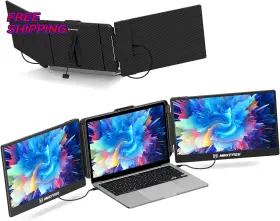
| Brand | SHENZHEN BAIJIAYOUPU TECHNOLOGY CO |
|---|---|
| Part Type | LAPTOP SCREEN EXTENDER MONITOR |
| Display Resolution Maximum | 1920 X 1080 |
| Contrast Ratio | 1000 |
| Warranty Description | 1 YEAR MANUFACTURER |
| Has Color Screen | YES |
| Pixel Pitch | 0.16 |
| Warranty Type | 1 YEAR MANUFACTURER WARRANTY |
| Refresh Rate | 60 HZ |
| Picture Quality Enhancement Technology | IPS |
| Brightness | 300 NITS |
| Viewing Angle | 178 DEGREES |
| Hardware Connectivity | HDMI, USB TYPE C |
| Model Name | S1 DUAL LAPTOP SCREEN EXTENDER |
| Response Time | 3 MILLISECONDS |
| Additional Features | ADJUSTABLE KICKSTAND, BUILT-IN SPEAKERS, FULL HD IPS, PLUG AND PL |
| Screen Size | 14 INCHES |
| Specific Uses For Product | MULTITASKING, REMOTE WORK |
| Adaptive Sync | FREESYNC |
| Screen Finish | MATTE |
| Unit Count | 1.0 COUNT |
| Item Weight | 2.3 POUNDS |
| Resolution | FHD 1080P |
| Display Type | LCD |
| Mounting Type | DESK MOUNT |
| Color | BLACK |
| Item Dimensions D X W X H | 0.9D X 13.9W X 8.1H |
| Compatible Devices | MAC/WINDOWS LAPTOP, SURFACE, PC, XBOX, PS4, PS5, ANDROID, APPLE S |
| Shape | FLAT |
| Built-in Media | 1 CARRYING BAG, 1 HDMI TO USB-C CABLE, 1 S1 SCREEN EXTENDER, 1 |
| Color Gamut | 0.72 |
| Size | 14INCH DUAL |
| UPC | 313093456440 |
Review SHENZHEN BAIJIAYOUPU TECHNOLOGY CO Co. Ltd. Inch Laptop Screen Extender S1 Dual Fhd Ips Portable Monitor For Laptops
Introducing the Baijiayoupu S1 Dual FHD IPS Monitor, an excellent laptop screen extender specifically designed for 13-17 inch laptops. This monitor is brought to you by Baijiayoupu Ltd, a reputable brand known for producing high-quality technology accessories.
The S1 Dual FHD IPS Monitor is a versatile and functional addition to your laptop setup. With its full high definition (FHD) 1920x1080 resolution, it delivers crisp and clear visuals, making your work or entertainment experience more enjoyable. The IPS (In-Plane Switching) technology ensures consistent color and wide viewing angles, allowing you to view your content from various perspectives without compromising image quality.
This monitor comes as a dual screen setup, enabling you to multitask more efficiently. Split your screen into two sections and work on multiple applications simultaneously. The screens are placed at a comfortable 130 adjustable angle, ensuring optimal viewing experience and reducing strain on your neck and eyes.
The Baijiayoupu S1 Dual FHD IPS Monitor is designed with a sleek and lightweight build. Its compact size makes it easy to carry around, making it a perfect travel companion for business professionals or students. The monitor is also equipped with a user-friendly control panel, allowing you to easily adjust the brightness, contrast, and other settings according to your preferences.
Additionally, the monitor features built-in speakers, delivering rich and clear sound to complement your visual experience. It also comes with a conveniently placed headphone jack, allowing you to use your favorite headphones for a more immersive experience.
The Baijiayoupu S1 Dual FHD IPS Monitor is easy to set up and connect with your laptop. It comes with a USB Type-C cable and an HDMI cable, ensuring compatibility with a wide range of devices. The monitor also supports touch input, adding another layer of convenience and functionality.
In conclusion, the Baijiayoupu S1 Dual FHD IPS Monitor is an excellent laptop screen extender that delivers crisp visuals, wide viewing angles, and efficient multitasking capabilities. Its sleek design, lightweight build, and user-friendly features make it a must-have accessory for anyone who uses a laptop for work or entertainment.
The Baijiayoupu Ltd 313093456440 14 inch Dual FHD IPS Monitor for 13-17 inch laptops is a laptop screen extender that aims to provide a larger and clearer display for users. Let's examine its pros and cons to help you make an informed decision.
Pros:1. Increased productivity: By providing a larger display, the screen extender can help increase productivity by allowing users to have more open windows or documents on the screen at once.
2. Improved visual experience: The IPS technology used in the monitor offers wide viewing angles and vibrant colors, resulting in a better visual experience.
3. Compatibility: The screen extender is designed to work with a wide range of laptops, making it a versatile option for many users.
4. Adjustable height: The monitor comes with an adjustable stand that allows users to adjust the height to find the most comfortable viewing angle.
5. Affordable: Compared to purchasing a new laptop, a screen extender is a more affordable option for users looking to increase their screen real estate.
Cons:1. Size and portability: The monitor is not portable and requires a stable surface to be used. This may not be ideal for users who frequently travel with their laptops.
2. Power requirements: The monitor requires an external power source, which may add to the overall setup and maintenance of the device.
3. Cables: The monitor comes with a limited number of cables, and users may need to purchase additional cables to connect their laptops.
4. Potential glare: Depending on the lighting conditions, the screen extender may create glare or reflections, which could impact the user experience.
In conclusion, the Baijiayoupu Ldt 313093456440 14 inch Dual FHD IPS Monitor for 13-17 inch laptops can be a useful tool for increasing productivity and improving the visual experience for laptop users. However, it may not be ideal for frequent travelers due to its size and power requirements. Ultimately, the decision to purchase this screen extender depends on individual needs and preferences.
Recommendation:If you frequently use your laptop for work or multitasking and require a larger display, then a screen extender like the Baijiayoupu Ldt 313093456440 14 inch Dual FHD IPS Monitor could be a worthwhile investment. However, if you frequently travel with your laptop or have limited desk space, then a portable external display or a larger laptop may be a better option for you.
Details:
If your laptop has a full-featured usb-c port .e. Usb-a hdmi connection. It attaches securely with adjustable brackets, anti-slip stoppers, and a built-in kickstand that adapts in both angle length . Dual-screen freedom on the go: instantly expand your laptop with a 14 fhd ips screen for seamless two-screen workspace wherever you work.
If you are using a usb-c to connection, ensure that your laptops port supports both power and data transmission. If your laptop does not have a full-featured usb-c port or the is in use, you can use usb-a to cable and an hdmi to connect monitor. Connection method: setup tips: connect method.
If you try the hdmi and usb-a connection method, make sure connect first second. Personalized viewing angle: it comes with a built-in stand. Students educators. Track real-time market data, manage your spreadsheets, and monitor trends across multiple screens, all from a single device.
If the screen displays no signal, simply disconnect hdmi cable and reconnect it. Enjoy personalized visual settings for a customized viewing experience. Just plug in and start working. Not only does it give you a more comfortable viewing angle, but also protects your laptop and improves work efficiency.
Slip it into your backpack and enjoy a screen setup that stays solid wherever you land. Backed by real support: from setup questions to missing cables or warranty help, our responsive human support team is here assist fast. When connecting the hdmi to usb-c cable, be sure to connect cable port labeled on monitor. Whether remote, commuting, or moving room to room, s1 keeps your setup fluid, focused, and productive.
Compatible with windows, Marcos, chromes, and select Linux systems no drivers needed. Ideal for games streamers. From home to cafes co-working spaces, s1 keeps your tools connected and workflow interruption-free. Wide compatibility, zero hassle: connect to most laptops 13 17 via full-featured usb-c or hdmi usb-a.
Remote workers, business travelers, and digital nomads can instantly expand their workspace, boosting productivity streamlining multitasking no matter where they are. Mirror or extend your display to manage code, dashboards, decks, docs more efficiently and stay in flow without constant tab switching. Once connected, activate your laptop to initialize the display. Supports charging, data transfer, and video signal transfer, you can connect to the monitor via usb-c.
If you are using an hdmi to usb-c cable usb-a setup, check the back of screen extender and ensure that is inserted into bottom hdmi-marked port identified by a label.
specifications monitorpug:
- brand: Shenzhen Baijiayoupu Technology Co
- part type: Laptop Screen Extender Monitor
- display resolution maximum: 1920 X 1080
- contrast ratio: 1000
- warranty description: 1 Year Manufacturer
- has color screen: Yes
- pixel pitch: 0.16
- warranty type: 1 Year Manufacturer Warranty
- refresh rate: 60 Hz
- picture quality enhancement technology: Ips
- brightness: 300 Nits
- viewing angle: 178 Degrees
- hardware connectivity: Hdmi, Usb Type C
- model name: S1 Dual Laptop Screen Extender
- response time: 3 Milliseconds
- additional features: Adjustable Kickstand, Built-in Speakers, Full Hd Ips, Plug And Pl
- screen size: 14 Inches
- specific uses for product: Multitasking, Remote Work
- adaptive sync: Freesync
- screen finish: Matte
- unit count: 1.0 Count
- item weight: 2.3 Pounds
- resolution: Fhd 1080p
- display type: Lcd
- mounting type: Desk Mount
- color: Black
- item dimensions d x w x h: 0.9d X 13.9w X 8.1h
- compatible devices: Mac/windows Laptop, Surface, Pc, Xbox, Ps4, Ps5, Android, Apple S
- shape: Flat
- built-in media: 1 Carrying Bag, 1 Hdmi To Usb-c Cable, 1 S1 Screen Extender, 1
- color gamut: 0.72
- size: 14inch Dual
- upc: 313093456440
shipping monitorpug:
- transit: 4-9 days
- class: standard
- type: fixed
- service: standard
returns monitorpug:
- method: money back
- paid by: seller
- time: 30 days
- policy: returns accepted
general monitorpug:
- category: Computers > Computers/tablets Networking > Monitors, Projectors Accs
seller monitorpug:
- # reviews: 115
- city: denver, colorado
- rating: 97.1%
offer monitorpug:
- availability: in stock
- options: ship-to-home
- started: june 1, 2026
- quantity: 1
- sold #: 12
payments monitorpug:
- other
- credit card: discover
- wallet: apple-pay
Similar Items:
- Shenzhen Baijiayoupu Technology Co Ltd 445036542507 Triple Laptop Screen Extender S2 14 Inch 1080p Hd Portable Dualmonitor For 13.3 17 In extended mode, you can easily manage multiple applications, different programs, and various documents in a neat workbench. Improve work efficiency with the s2 triple-screen monitor - this portable dual monitor supports extended/ mirror/ single 2ND screen/ pre mode, offering you a smarter way for ...(February 28th, 2026)
