- Used Computers Monitors Deals
- sku: 6717131694929573
- CISCO CP-DX80-K9
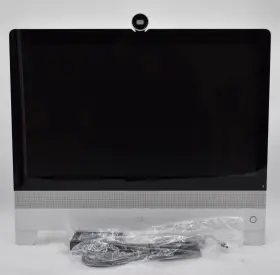
CP-DX80-K9 CISCO Webex Touchscreen Conference Monitor Adapter
| Brand | CISCO |
|---|---|
| Manufacturer Part Number | CP-DX80-K9 |
| Part Type | MONITOR ADAPTER |
| Screen Size | 23 IN |
| Maximum Resolution | 1920 X 1080 |
| Color | WHITE |
| Video Inputs | HDMI STANDARD |
| Features | BUILT-IN CAMERA, BUILT-IN SPEAKERS, TOUCHSCREEN |
| Most Suitable For | CASUAL COMPUTING |
| Aspect Ratio | 16 |
| Product Line | CISCO WEBEX |
Review CISCO Inch Webex Dx80 Model Cp-dx80 Touchscreen Conference Monitor Adapter
The Cisco CP-DX80-K9 23 Webex DX80 CP-DX80 Touchscreen Conference Monitor Adapter is an innovative solution designed to enhance your video conferencing experience, especially for users of the Cisco Webex DX80 device. This adapter allows you to attach a touchscreen monitor (maximum size of 23 inches and 16:9 aspect ratio) to your DX80 conference station, significantly expanding the size and capabilities of your video conferencing display.
The CP-DX80 adapter is engineered with a sleek and elegant design, making it a perfect complement to the DX80 device. It boasts a high-quality construction, finished in a professional look that fits harmoniously in any conference room setup. The adapter's modern design not only adds an aesthetic appeal but also ensures a secure and sturdy attachment of the touchscreen monitor to the DX80 device.
The touchscreen functionality enabled by this adapter offers an enhanced and more interactive experience during video conferences. Users can easily navigate through menus, tapping and swiping with ease to adjust settings, view shared content, and manage presentations, among other functions. The integration of a touchscreen monitor not only improves the user experience but also makes the device more versatile for various applications.
The CP-DX80-K9 adapter is compatible with several power sources, including PoE (power over Ethernet), making it even easier to install and integrate with your conference room setup. The quick and simple installation process ensures minimal downtime and saves you valuable time that can be spent on more important tasks.
The Cisco CP-DX80-K9 23 Webex DX80 CP-DX80 Touchscreen Conference Monitor Adapter is an excellent investment for organizations and individuals looking to elevate their video conferencing experience with larger, more interactive, and higher-resolution displays. Its compatibility with the popular Cisco Webex DX80 device, along with its modern design, user-friendly touchscreen functionality, and flexible power options, make it a must-have addition to any advanced video conferencing setup.
The Cisco CP-DX80-K9 23 Webex DX80 CP-DX80 Touchscreen Conference Monitor Adapter is a device designed to enhance the functionality of Cisco's DX80 collaboration endpoints. This device provides a touchscreen interface for controlling video conferencing calls, managing content, and managing calls. Here are some potential pros and cons of purchasing this device:
Pros:1. Enhanced User Experience: The CP-DX80 touchscreen interface provides an intuitive and user-friendly experience, which can help streamline collaboration sessions and increase employee productivity.
2. Improved Video Conferencing Features: The CP-DX80 adapter expands the video conferencing features of the DX80, allowing users to have more control over their video calls and enhancing the overall meeting experience.
3. Better Content Sharing: The touchscreen interface makes it easier to share content during video conferencing sessions, reducing the need for additional equipment or software.
4. Easy Setup: The CP-DX80 adapter is easy to install and setup, making it a good option for organizations that want to quickly enhance their collaboration capabilities.
5. Seamless Integration: The CP-DX80 adapter seamlessly integrates with Cisco's Webex platform, ensuring a consistent and reliable user experience.
Cons:1. Cost: The CP-DX80 adapter is a relatively expensive piece of hardware, which may be a barrier for some organizations with limited budgets.
2. Requires Cisco DX80: This adapter only works with Cisco's DX80 collaboration endpoint, which may limit its usability for organizations that use other video conferencing platforms.
3. Limited Functionality: While the touchscreen interface provides several benefits, some users may find that they don't need all of the additional features and prefer a more basic video conferencing setup.
4. Additional Maintenance: As with any hardware, the CP-DX80 adapter requires regular maintenance and upkeep, which can add to the overall cost and complexity of the device.
Conclusion:The Cisco CP-DX80-K9 23 Webex DX80 CP-DX80 Touchscreen Conference Monitor Adapter can provide significant benefits for organizations that use Cisco's DX80 collaboration endpoints, including a better user experience, improved video conferencing features, and easier content sharing. However, the device is relatively expensive, and its functionality may be overkill for some organizations. Ultimately, the decision to purchase the CP-DX80 adapter depends on an organization's specific video conferencing needs and budget.
Recommendation:If an organization already uses Cisco's DX80 collaboration endpoints and needs to enhance their video conferencing capabilities, then the CP-DX80 adapter is a worthwhile investment. However, organizations with limited budgets or simpler video conferencing needs may want to consider alternative solutions. In such cases, they could explore cloud-based video conferencing software or more basic hardware options. Ultimately, it's essential to carefully evaluate an organization's video conferencing requirements and budget before making a decision.
Details:
Power adapter and Ethernet cable included.
specifications monitorpug:
- brand: Cisco
- mpn: Cp-dx80-k9
- part type: Monitor Adapter
- screen size: 23 In
- maximum resolution: 1920 X 1080
- color: White
- video inputs: Hdmi Standard
- features: Built-in Camera, Built-in Speakers, Touchscreen
- most suitable for: Casual Computing
- aspect ratio: 16
- product line: Cisco Webex
shipping monitorpug:
- service: fedex ground economy
- carrier: fedex
- transit: 5-10 days
- type: calculated
- class: economy
seller monitorpug:
- rating: 99.3%
- city: sacramento, california
- # reviews: 878
payments monitorpug:
- other
- wallet: apple-pay
- credit card: visa
general monitorpug:
- category: Computers > Computers/tablets Networking > Monitors, Projectors Accs
offer monitorpug:
- best offers: true
- availability: in stock
- sold #: 26
- started: january 17, 2025
- prices: $40.00–$236.94
- item condition:
- New
- New – Open box
- Seller refurbished
- Used
- options: ship-to-home
returns monitorpug:
- paid by: seller
- method: money back
- time: 30 days
- policy: returns accepted
Similar Items:
- Cisco 55s V01 Webex 55 Inch 4k Touchscreen Video Conferencing Display Part #: Cisco 55S V01 for sale...(April 30th, 2024)
- Cisco Spark-board55 Webex Spark Board 55 Inch Collaboration Lcd No Stand Grade A Orders which total over $500 ship 'signature required. Buyer to pay all shipping and handling charges. Servers: no keys are included with servers; the server unlocked when shipped. The item was tested in a working condition and is guaranteed non DOA. The offer is for only what stated as being ...(August 14th, 2024)
- Cisco Cts-mon-55-ww New In Box Telepresence 55 Inch Display Led Monitor Part #: Cisco CTS-MON-55-WW for sale...(April 27th, 2025)
- Cisco 74-115968-01 Telepresence Touch 10 Ttc5-09 Panel Monitor Lot Of 2 Elevate your conference room experience with the Cisco teleprocessing touch 10, a sleek and intuitive touch panel monitor designed to streamline multimedia presentations video conferencing. The responsive touch interface simplifies navigation, allowing for effortless control of your meetings and ...(May 8th, 2025)
- Cisco 889728288774 Cs T10 Ts V03 Lcd Display Touchscreen 10.1 Inch Used May be missing components or parts not essential to key functions. Valley tech does not intentionally or otherwise pretend to be associated with represent any of the manufacturers. Used - see photos for details. Damage to latches, hinges, keyboards, etc. May not include focus materials some parts, ...(October 2nd, 2025)
