- Used Computers Monitors Deals
- sku: 3621972296545593
- DELL DELL-P3424WEB
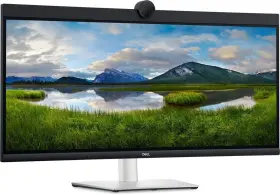
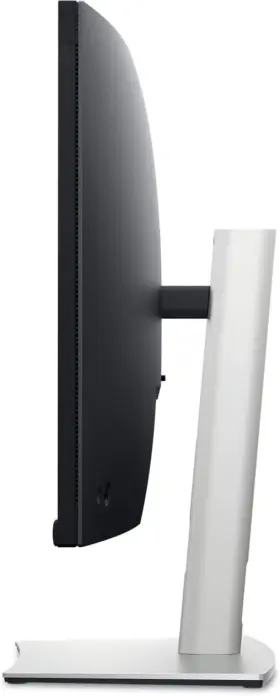
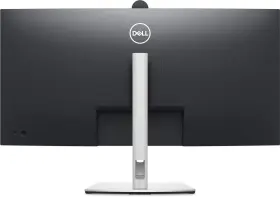
DELL-P3424WEB DELL Curved Video Conferencing Monitor Screen
| Brand | DELL |
|---|---|
| Manufacturer Part Number | DELL-P3424WEB |
| Part Type | VIDEO MONITOR SCREEN |
| UPC | 884116441489 |
| Screen Size | 34.14 |
| Item Height | 8.90 |
| Box Size | 38X21X9 |
| Features | CURVED SCREEN |
| Item Length | 37.40 |
| Item Width | 21.00 |
| Product Line | DELL P |
Review DELL P3424web 34 Curved Video Conferencing Monitor Used Screen Tested
The Dell P3424W P3424W 34-inch Curved Video Conferencing Monitor is a cutting-edge display designed for modern professionals seeking an immersive and productive work experience. This UltraWide monitor boasts a stunning 3440 x 1440 resolution, delivering crisp and vivid images that span across your field of view.
The monitor's 34-inch curved screen provides a panoramic view, reducing eye strain and improving overall visual comfort by minimizing the need to constantly switch between multiple windows or screens. The curvature also enhances the sense of depth and immersion, making it ideal for video conferencing, digital design, and multitasking.
The Dell P3424W is equipped with a premium In-Plane Switching (IPS) panel, ensuring accurate color representation and wide viewing angles, ensuring that content appears vibrant and true-to-life from virtually any position. The monitor's 100% sRGB and 99% Rec. 709 color gamut coverage ensures that graphics and images are faithfully reproduced, making it an excellent choice for graphic designers, photographers, and video editors.
The monitor's ergonomic design features a height-adjustable stand, allowing for easy customization to suit your preferred workspace setup. The stand also has a tilt and swivel function, providing additional flexibility for optimal viewing angles. The monitor's slim bezel design further enhances its versatility, allowing for seamless multi-monitor setups.
The Dell P3424W P3424W features built-in speakers with Waves MaxxAudio technology, delivering rich and immersive sound quality for audio conferencing and multimedia playback. The monitor also includes a webcam with a privacy shutter and a microphone, making it easy to participate in video conferences without the need for additional external equipment.
In terms of connectivity, the monitor offers a variety of ports, including two HDMI 2.0 ports, a DisplayPort 1.4, USB Type-C with DisplayPort Alt Mode, and four USB 3.0 ports. This versatility allows you to connect multiple devices, such as laptops, desktops, and mobile devices, to the monitor simultaneously.
The Dell P3424W P3424W 34-inch Curved Video Conferencing Monitor is an excellent investment for professionals seeking a high-performance, feature-rich, and versatile display. Its advanced technology, customizable design, and comprehensive connectivity options make it an ideal choice for those who demand the best in productivity and visual experience.
Pros of Dell P3424WB:1. Wide Screen: With a 34-inch curved screen, the Dell P3424WB provides a wide viewing angle, making it ideal for video conferencing, multitasking, and editing.
2. High Resolution: The monitor offers a 3440 x 1440 resolution, ensuring crisp and clear images, making it easy to view multiple windows side by side.
3. USB-C Port: The monitor features a USB-C port, which allows for easy connectivity and data transfer between devices.
4. Built-in Speakers: The Dell P3424WB has built-in speakers, eliminating the need for external sound systems.
Cons of Dell P3424WB:1. Price: The monitor is on the higher end of the price range, which may be a deterrent for some buyers.
2. Power Consumption: Due to its large size and high resolution, the monitor consumes a significant amount of power, which may lead to higher energy bills.
3. Weight: The Dell P3424WB is quite heavy, making it difficult to move around or mount on the wall.
Conclusion:The Dell P3424WB is a high-quality video conferencing monitor that offers a wide screen, high resolution, and built-in speakers. However, its high price and power consumption may be a concern for some buyers. If you are in the market for a large, high-resolution monitor for video conferencing and multitasking, the Dell P3424WB could be a good option for you.
Recommendation:If you are looking for a more affordable alternative, consider the Dell U3417W, which offers similar features at a lower price point. However, if budget is not a concern and you want the best possible viewing experience for video conferencing, the Dell P3424WB is an excellent choice.
Details:
This monitor supports multi-OS environments. Multitask efficiently: connect two pc sources to the monitor our intelligent auto km feature detects second connected and seamlessly switches controls over. Dell p3424web 34 curved video conferencing monitor: about this item: powerful webcam: take stage with a 2k HD webcam that packs punch. Km keyboard, video and mouse allows you to control both PCs with a single keyboard mouse.
The large Sony starves sensor is 29.5% larger than the previous model. Make smooth connections: view content from both pc sources with picture-by-picture BP and picture-in-picture pip. Interaction secured: the manual webcam shutter and convenient microphone mute button on this zoom-certified monitor helps ensure that you're only communicating what you want to share, when share it. This single-cable solution also reduces cable clutter and transmits power, data audio all at once.
Connect to productivity: with wired connectivity options like rj45 and USB-c, your monitor delivers reliable Ethernet, power, audio video all in a clutter-free setup. Enhanced manageability: managing your monitor is easy with mac address pass-through, PX boot, and wake-on-LAN conveniently built in. Easier connections: launch teams meetings effortlessly with the quick access touch control on this certified for Microsoft monitor. Look great in low light: temporal 3d and spatial 2d noise reduction automatically eliminates motion blur grainy images light, while AI auto framing keeps you the middle of frame even as move around.
specifications monitorpug:
- brand: Dell
- mpn: Dell-p3424web
- part type: Video Monitor Screen
- upc: 884116441489
- screen size: 34.14
- item height: 8.90
- box size: 38x21x9
- features: Curved Screen
- item length: 37.40
- item width: 21.00
- product line: Dell P
returns monitorpug:
- paid by: buyer
- policy: returns accepted
- method: money back
- time: 30 days
shipping monitorpug:
- transit: 2-5 days
- carrier: usps
- type: fixed
- service: usps priority mail
- class: expedited
seller monitorpug:
- city: simpsonville, south carolina
- # reviews: 338
- rating: 95.4%
offer monitorpug:
- in stock #: 5
- sold #: 35
- options: ship-to-home
- prices: $400.00–$630.00
- item condition:
- New
- Used
- For parts or not working
- started: july 21, 2024
- availability: in stock
general monitorpug:
- category: Computers > Computers/tablets Networking > Monitors, Projectors Accs
payments monitorpug:
- other
- wallet: apple-pay
- credit card: american-express
Similar Items:
- Dell C2423hsap C2423h 24 Inch Video Conferencing Computer Monitor UPS technology delivers premium picture quality and consistent colors with wide viewing angles that are ideal for video conferencing. Highlights: the 1080P conferencing webcam delivers seamless video and screen clarity, while the pop-up function of hides camera behind when you push it down. Video ...(January 22nd, 2024)
- Dell P2723qe 27 Inch Monitor Usb-c Hub 4k 3840 X 2160 5ms 60hz Not Stand What is included. Dell P2723QE 27 monitor USB-c hub 4k 3840 x 2160 5MS 60HZ not stand. Item condition. Units may have minor scratches scuffs located around its body. This unit is: used. Includes what is on pictures only. Please see pictures for a more detailed view of the units condition. A part of ...(January 23rd, 2024)
- Dell U3419w 34 Inch Ultra Sharp 21 9 Led Ips Curved Monitor Scuffs are not visible when in use. Comes with stand and power cord. Has a few small scuffs on the right side of screen that are shown in attached photos. Monitor in good condition. Feel free to ask any questions. Overall very nice monitor, with built-in speakers, USB-c connectivity, and updated to ...(January 23rd, 2024)
- Dell U3415wb Ultrasharp 34 Inch Curved Ultra Wide Qhd Ips Lcd Monitor Most of our equipment is off-lease, used equipment, so whether its a laptop, desktop, monitor, printer, or one other amazing deals, each piece likely coming to you from working business-type environment. Note: if its not in the pictures or specifically mentioned text, probably included. Our ...(January 23rd, 2024)
- Dell S2716dg Likenew S2716dgr 27 Inch 2560x1440 Gaming Qhd 144hz G-sync Monitor Tv Screen Display position adjustments pivot rotation, swivel, tilt. Dell S2716DG led with sync: 27 HD wide 1440P gaming computer monitor: : save $100S compared. >>> shipping fast from Indian, a!, aid orphans globally serve families in adoption services lifelong, - about me I aim to please my buyers. Near new...(January 23rd, 2024)
- Dell Aw3423dwf Alienware Aw3423dw 34ftft Oled Curved Gaming Monitor Screen Broken The monitor is designed with a portable and wall-mountable feature, it also has headphone jack USB hub. Get ready to level up your gaming experience with this Dell alien ware monitor. Despite the broken screen, rest of features work perfectly, providing high-quality visuals with 1000 CD/m brightness...(January 23rd, 2024)
- Dell U3421we 34.1 Inch Ultrasharp Curved Monitor Wqhd Gray Good Condition 73 No scratches on the screen!, power cable included. Dell 34.1 inch U3421WE ultra sharp curved monitor HD gray - good condition #73, condition. There may be some scratches around the bezels and base...(January 23rd, 2024)
- Dell St2420lb Black Hdmi Dvi Vga 24 Inch Widescreen 1920 X 1080 Hd Led Lcd Monitor Model: Dell ST2420LB. Type: LCD monitor. Color: black. This monitor works well and has some large cosmetic scratches on the very backside smaller scuffs throughout. It comes with the VGA cable shown in photos. Dell ST2420LB black HDMI div VGA 24 widescreen 1920 x 1080 HD led LCD monitor product ...(January 24th, 2024)
- Dell U2312hm Lot Of 2 U2312hmt Ips 23 Inch Monitor Fhd 1920x1080p With Power Cables Furthermore, the power nap software included with monitor makes it easy to preset dimming settings or automatically adjust brightness when images displayed are consuming too much energy. The monitor can be adjusted for optimal height , and its 16:9 aspect ratio allows you to view the display as a ...(January 24th, 2024)
- Dell Mr2217 21.5 Inch Medical Led Lcd Monitor With Ac Adapter No Stand Or Mgmt Arm Note: if its not in the pictures or specifically mentioned text, probably included. Outer case may show some minor scratches/scuffs from normal use. Please see pictures.includes: monitor with ac adapter. Stand is not included, cable management clip on back gone.these items have been tested, and are ...(January 24th, 2024)
- Dell U2415b 24 Inch Lcd Monitor With Stand And Cables ...(January 24th, 2024)
