- Used Computers Monitors Deals
- sku: 12078962607637771
- DOUGH ES07EFB
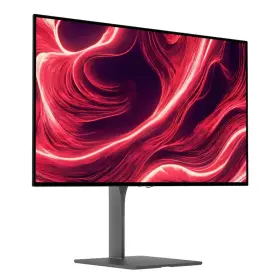
ES07EFB DOUGH Spectrum Qhd Oled Gorilla Glass Monitor Box
| Brand | DOUGH |
|---|---|
| Manufacturer Part Number | ES07EFB |
| Part Type | GLASS MONITOR BOX |
| Screen Size | 27 IN |
| Brightness | 1000 CD/M |
| Refresh Rate | 480HZ |
| Response Time | 0.03 MS |
| Color | BLACK |
| Video Inputs | HDMI 2.1, USB-C |
| Most Suitable For | GAMING |
| Aspect Ratio | 16 |
| Unit Type | UNIT |
| Display Type | IPS OLED |
| Maximum Resolution | 2560 X 1440 |
| Contrast Ratio | 1, 500 |
| Country Of Origin | CHINA |
| Product Line | DOUGH SPECTRUM |
| UPC | 897118180603 |
Review DOUGH Spectrum Black Qhd 480hz Oled Gorilla Glass Monitor Only Open Box
Introducing the Dough ES07EFB Spectrum 27 QHD 480Hz OLED Gorilla Glass Monitor, a stunning display that combines high-resolution imagery, rapid refresh rates, and robust durability. This monitor boasts a 27-inch diagonal size and a Quad High Definition (QHD) resolution of 2560 x 1440 pixels, enabling crisp and detailed visuals for all your computing needs.
The Dough ES07EFB Spectrum monitor is an OLED (Organic Light-Emitting Diode) model, delivering perfect blacks and an infinite contrast ratio. OLED technology also provides wider viewing angles, ensuring that colors remain accurate no matter where you're sitting.
One of the most impressive features of this monitor is its impressive 480Hz refresh rate. This high refresh rate reduces input lag and motion blur, making it ideal for gaming or fast-paced multimedia applications. This monitor is perfect for competitive gamers and professionals who require the ultimate in responsiveness and visual clarity.
The Dough ES07EFB Spectrum monitor is also protected by Gorilla Glass, a durable and scratch-resistant material that ensures the display remains unscathed even during the most demanding use. This added layer of protection makes the monitor an excellent choice for both home and professional environments.
Additionally, this monitor comes with a sleek and modern design, featuring thin bezels and a minimalist stand that allows for easy adjustments in height, tilt, and swivel. The OSD (On-Screen Display) menu provides users with intuitive controls for fine-tuning picture settings and configuring other display features.
Overall, the Dough ES07EFB Spectrum 27 QHD 480Hz OLED Gorilla Glass Monitor is a high-performance and durable display that offers stunning visuals, rapid refresh rates, and robust protection. Whether you're a gamer, graphic designer, or power user, this monitor is an excellent investment for anyone seeking the ultimate viewing experience.
Pros and Cons of buying a Dell S2721QS (OLED, QHD, 480Hz, Gorilla Glass) Monitor
The Dell S2721QS monitor is a high-end display that offers several advanced features, including an OLED panel, QHD resolution, and a 480Hz refresh rate. However, like any other technology product, it comes with its pros and cons. In this analysis, we will discuss the key advantages and disadvantages of investing in this monitor.
Pros:1. OLED technology: OLED (Organic Light-Emitting Diode) panels provide deeper blacks, wider viewing angles, and faster response times than traditional LCD or LED-backlit displays.
2. QHD resolution: With a resolution of 2560 x 1440 pixels, this monitor offers a significant improvement in image clarity and detail over standard HD displays.
3. 480Hz refresh rate: A high refresh rate allows for smoother gaming and reduces lag, making it an ideal choice for competitive gamers.
4. Gorilla Glass: The monitor's protective Gorilla Glass coating adds durability and resistance to scratches and impacts, offering peace of mind for those with an active workspace or gaming setup.
5. HDR400: The monitor supports HDR400, which enhances the contrast and color range, resulting in more vibrant and lifelike visuals.
Cons:1. Price: The Dell S2721QS is a premium monitor, and its high cost may not be suitable for budget-conscious consumers.
2. Power consumption: Due to its advanced features and high refresh rate, the monitor consumes more power than standard displays, which may result in higher electricity bills.
3. Potential image retention: OLED panels are susceptible to image retention (ghosting) if static images are displayed for extended periods, which could be a concern for those using the monitor for extended work sessions.
4. Limited connectivity options: The monitor offers limited connectivity options, including only one HDMI 2.1 port and one DisplayPort 1.4 port.
Conclusion:The Dell S2721QS is an excellent choice for those who demand high-performance displays for gaming, graphic design, or video editing. Its OLED panel, QHD resolution, 480Hz refresh rate, and Gorilla Glass coating offer superior image quality, durability, and responsiveness. However, its high cost, power consumption, potential image retention, and limited connectivity options may deter some potential buyers.
Recommendation:If you are a professional gamer, graphic designer, or videographer, and budget is not a constraint, the Dell S2721QS is a worthy investment that will provide you with exceptional visual performance and durability. However, if you are on a tight budget or require more connectivity options, you may want to consider alternative monitors with similar features but at a lower price point.
Details:
Available between 48 and 120hz, at 50% duty cycle. The black equalizer adjusts dark areas of the screen so you can always find your foes. Condition: fully tested and functional device in excellent condition ready for resale. Dough spectrum black 27 qhd 480hz oled gorilla glass monitor only open box::: designed for games who demand the best from themselves and their gear, delivers cutting-edge performance unparalleled image quality. A frame counter overlay shows you how well your system performs and helps pick the right settings for any game.
Cross hair overlay: assists your aim and gives a competitive advantage. Its aluminum build offers improved cooling while creating a sleek design that fits in no matter your environment. Where quality is number one. Pixel-perfect up scaling: using integer-ratio pixel duplication for low-resolution input signals, maintains the iconic look of art and keeps retro games looking crisp.
As the first monitor to offer a gorilla glass variant, it unleashes full potential of oled panels by improving black levels and increasing sharpness, all while reducing reflections. Dual-screen: dual-screen let's you keep an eye on everything at once. Split-screen mode places the screens from two computers side-by-side, picture-in-picture puts image a secondary computer in corner.
specifications monitorpug:
- brand: Dough
- mpn: Es07efb
- part type: Glass Monitor Box
- screen size: 27 In
- brightness: 1000 Cd/m
- refresh rate: 480hz
- response time: 0.03 Ms
- color: Black
- video inputs: Hdmi 2.1, Usb-c
- most suitable for: Gaming
- aspect ratio: 16
- unit type: Unit
- display type: Ips Oled
- maximum resolution: 2560 X 1440
- contrast ratio: 1, 500
- country of origin: China
- product line: Dough Spectrum
- upc: 897118180603
offer monitorpug:
- prices: $589.99–$974.39
- item condition:
- New
- Open box
- options: ship-to-home
- sold #: 11
- in stock #: 4
- started: january 2, 2026
- availability: in stock
seller monitorpug:
- rating: 100.0%
- # reviews: 168429
- city: winnetka, california
general monitorpug:
- category: Computers > Computers/tablets Networking > Monitors, Projectors Accs
shipping monitorpug:
- service: standard, expedited, overnight
- class: standard, expedited, one-day
- transit: 4-10 days
- type: fixed
returns monitorpug:
- method: money back
- paid by: seller
- policy: returns accepted
- time: 30 days
payments monitorpug:
- credit card: diners-club
- other
- wallet: paypal
Similar Items:
- Eve Es07d03 Dough Spectrum 4k 144hz Monitor Matte No Stand Vesa Mount No mount just the monitor itself. Used 27 inch gaming monitor excellent monitor and great for productivity work. It controls the menu, however, you can still control it easily. Only one con is that the top part of button on back broken...(February 4th, 2024)
- Dough 700433153150 Spectrum One 27-inch Gaming Monitor 4k Hdr 144hz Refresh Rate 1ms The only included accessory is the power cord. The item still functions but may have minor issues or decreased performance. Used-fair: the item has been previously owned and shows significant signs of use. This products condition is used-fair - this monitor in good cosmetic however, the display port...(September 17th, 2024)
- Dough Es07d03 07d Spectrum One 4k 144hz 27 Inch Glossy Nano-ips Monitors Buy Both Get A Deal This version comes in the glossy display option, delivering deep contrast and vibrant colors. 144HZ refresh rate ultra-smooth gaming experience. Glossy coating enhanced contrast and clarity. Note: this listing does not include a stand. Includes: power cable, brick, original box, instructions. ...(February 22nd, 2025)
- Dough 897118180580 Eve Spectrum 27 Inch Monitor Stand Es07e31 Brand New Perfect for enhancing your workspace with a sturdy and sleek monitor stand. The stand is free-standing and in a sleek black color. The Dough eve spectrum 27 monitor stand ES07E31 is a brand new adjustable monitor stand that allows for screen height adjustments up to 4.8 inches. It has a load ...(March 20th, 2025)
- Dough 897118180054 Ri5 Spectrum One 27 Inch 4k Hdr Glossy Gaming Monitor Stand Not Included Dough spectrum one 27 4k Dr glossy gaming monitor. Please review photos prior to buying. RI5019988 DX. Cosmetically this item remains in good condition. Normal signs of use...(May 12th, 2025)
- Dough 897118180214 Ri5 Eve Spectrum 27 Inch Monitor Stand Es07d04 Cosmetically this item remains in good condition. Dough eve spectrum 27 monitor stand ES07D04. Normal signs of use. RI5019989 bx. Please review photos prior to buying...(May 12th, 2025)
- Dough 897118180498 Eve Spectrum One Oem Power Supply Dough eve spectrum one oem power supply, supply...(June 6th, 2025)
- Dough Es07e91 Spectrum 32 Inch Class 4k 240-hz Dual-mode Woled Monitor Metallic New Open Box Monitor size with 4k hd 3840 x 2160 pixels; turn on high-speed mode for 1080P at up to 480 hz. Wiled white oled screen. Dough spectrum 32 class 4k 240-HZ dual-mode wiled monitor metallic new open box monitor only: : designed for games who demand the best from themselves and their gear, 32-IN. 150 ...(December 31st, 2025)
- Dough Es07ef5 Spectrum 27 Inch Qhd 480 Hz Oled Gaming Monitor free Shipping Brand new and in box...(April 2nd, 2026)
- Eve Es07d02 Spectrum 27inch Dough Monitor Without Stand Brand new haven used just opened the box to look whats inside and show it...(May 29th, 2026)
