- Used Computers Monitors Deals
- sku: 12648019089899792
- EVICIV EV156U05
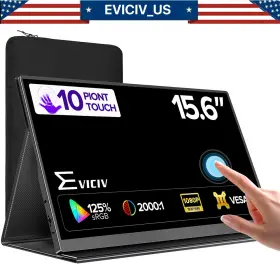
EV156U05 EVICIV Touch Usb Monitor Display Raspberry Pi
| Brand | EVICIV |
|---|---|
| Manufacturer Part Number | EV156U05 |
| Part Type | DISPLAY MONITOR |
| Country Of Origin | UNITED STATES |
| Aspect Ratio | 16 |
| Brightness | 250 CD/M |
| Color | BLACK |
| Contrast Ratio | 2000 |
| Display Type | IPS |
| Energy Star | A |
| Features | BUILT-IN SPEAKERS, HEADPHONE JACK, TOUCHSCREEN |
| Manufacturer Warranty | 1 YEAR WARRANTY |
| Maximum Resolution | 1920 X 1080 |
| Most Suitable For | CCTV, SERIOUS GAMING, GAMING, GRAPHIC DESIGN, CASUAL COMPUTING |
| Product Line | 15.6 INCH TOUCH 1080P MONITOR |
| Refresh Rate | 60 HZ |
| Response Time | 3 MS |
| Screen Size | 15.6 IN |
| Video Inputs | USB-C, HDMI MINI |
| Ec Range | A G |
| Unit Type | UNIT |
Review EVICIV 15.6 Inch Touch Usb-c Portable Monitor Display For Raspberry Pi
The Eviciv EV156U05 is a 15.6-inch touch USB-C monitor designed specifically for use with the Raspberry Pi single-board computer. With a full HD 1920 x 1080 resolution display, this monitor offers crisp and clear visuals for your projects.
The touchscreen functionality of the Eviciv EV156U05 adds an extra layer of interactivity to your Raspberry Pi setup. The capacitive touchscreen is responsive and accurate, making it ideal for use in applications where input via a keyboard and mouse may not be convenient.
The monitor features a USB-C connection, which not only delivers power to the monitor but also transmits data, eliminating the need for additional cables. This makes setup simple and streamlined. The USB-C port also supports DisplayPort Alt Mode, allowing you to use the monitor with other devices that support this standard.
The Eviciv EV156U05 comes with built-in speakers, providing audio output without the need for external speakers. The monitor also has a headphone jack for private listening.
Additionally, the monitor has a adjustable stand, which allows you to adjust the angle of the display to suit your needs. The stand is also detachable, making it easy to transport the monitor if needed.
The Eviciv EV156U05 is a versatile and functional addition to any Raspberry Pi setup. Its full HD touchscreen display, USB-C connection, built-in speakers, and adjustable stand make it a great choice for a variety of applications, from media streaming to software development.
The Eviciv EV156U05 15.6-inch USB-C touch monitor is an interesting option for those looking to connect a monitor to their Raspberry Pi for various projects or use cases. Below are some pros and cons to consider before making a purchase.
Pros:1. Touchscreen functionality: Having a touchscreen monitor can make interacting with the Raspberry Pi more intuitive, especially for graphical applications or for using software that relies heavily on touch input.
2. USB-C connection: The monitor uses a USB-C connection, which can provide both power and video signal to the Raspberry Pi, simplifying the setup process and reducing the number of cables required.
3. 1920x1080 resolution: This resolution is common and widely supported, ensuring that most software and applications will look good on the monitor.
4. Portability: The monitor's size and touchscreen functionality make it a good option for portable projects, such as a media center or a mobile workstation.
Cons:1. Limited compatibility: The monitor may not be fully compatible with all versions of the Raspberry Pi operating system, and some users have reported issues with touch input or video quality.
2. Power consumption: The monitor requires a significant amount of power to operate, which can put additional strain on the Raspberry Pi's power supply.
3. Cost: Compared to other monitors in its class, the Eviciv EV156U05 can be more expensive.
4. Size: The monitor's 15.6-inch size may be larger than some users need, adding to the overall size and weight of a portable setup.
Conclusion:The Eviciv EV156U05 15.6-inch USB-C touch monitor can be a useful addition to a Raspberry Pi setup, offering touchscreen functionality and a simplified connection method. However, it comes with some limitations, such as compatibility issues and power consumption concerns, and its cost and size may be prohibitive for some users. Ultimately, the decision to purchase this monitor depends on the specific needs and budget of the user.
Recommendation:If a touchscreen monitor is a must-have for your Raspberry Pi project and you have the budget for it, the Eviciv EV156U05 could be a good option to consider. However, if you're looking for a more cost-effective or compact solution, you may want to explore other options, such as a traditional HDMI monitor or a smaller touchscreen monitor with a different connection type.
Details:
If no signal or power saving mode appears, please switch the type-c cable head to another side and reconnect monitor. Whether switching, sliding, or zooming, everything can be accurately and seamlessly controlled, improving your work efficiency through intuitive touch control. True color restoration: 15.6-inch ips laptop monitor, 1920 x 1080 full hd resolution, 2000: 1 contrast ratio, 350 nits brightness, and Dr technology, providing you with clearer, smoother, superior gaming/media performance; the game monitor is equipped blue light filtering eye care technology to reduce fatigue during prolonged use. With other adapters, the voltage may be insufficient.
Support single type-c cable for display power device model. Whats in the box. 1 Eviciv portable monitor, mini hdmi to cable, 2 usb c power adapter, smart cover, manual. If the screen signal is poor or flickers, make sure you are only operating monitor with adapter that came it.
The monitor turns on in the default power save mode. If it doesn't, you'll need a type-c to hdmi adapter for signal transmission. Eviciv 15.6 touch usb-c portable monitor 1920 1080 display for raspberry pi 5/4 2026 touchscreen 1080p monitor.: 10 point display: the portable touch display features a point capacities function, providing highly accurate, sensitive, and seamless experience. If the screen still flickers, please swap hdmi cable to test.
Wide compatibility: the portable external monitor provides 2 fully functional c-ports, 1 mini hdmi port, and tog interface, which can be perfectly connected to your laptop, computer, phone, game console, switch, keyboard, mouse; no driver required, just plug in use; supports multiple modes such as copy mode, expansion second display easily configured for horizontal vertical.
specifications monitorpug:
- brand: Eviciv
- mpn: Ev156u05
- part type: Display Monitor
- country of origin: United States
- aspect ratio: 16
- brightness: 250 Cd/m
- color: Black
- contrast ratio: 2000
- display type: Ips
- energy star: A
- features: Built-in Speakers, Headphone Jack, Touchscreen
- manufacturer warranty: 1 Year Warranty
- maximum resolution: 1920 X 1080
- most suitable for: Cctv, Serious Gaming, Gaming, Graphic Design, Casual Computing
- product line: 15.6 Inch Touch 1080p Monitor
- refresh rate: 60 Hz
- response time: 3 Ms
- screen size: 15.6 In
- video inputs: Usb-c, Hdmi Mini
- ec range: A G
- unit type: Unit
general monitorpug:
- category: Computers > Computers/tablets Networking > Monitors, Projectors Accs
seller monitorpug:
- city: brooklyn, new york
- rating: 99.6%
- # reviews: 920
returns monitorpug:
- method: money back
- time: 60 days
- policy: returns accepted
- paid by: seller
shipping monitorpug:
- class: standard
- transit: 4-8 days
- service: standard
- type: fixed
offer monitorpug:
- started: february 4, 2026
- best offers: true
- sold #: 10
- prices: $59.99–$369.99
- item condition:
- Certified - Refurbished
- Used
- Open box
- New
- options: ship-to-home
- in stock #: 5
- availability: in stock
payments monitorpug:
- other
- credit card: mastercard
- wallet: paypal
Similar Items:
- Eviciv Ev156j10 Azimor 4k Portable Monitor 15.6 Inch Ips Uhd 3840 2160 1200 1 Testing will include all the basics of an item including battery charge, basic functionality, ports, screen response, etc. 4k portable monitor 15.6 item details physical condition, great!, operational tested and working fine. Accessories, comes with usb-c cable...(May 1st, 2024)
- Eviciv 156b15 Used 1080p Portable Monitor 15.6 Inch 1920 1080 Full Hd Hdr Ultra Slim Matte Screen Multiple ports with multiple interfaces integrated, a portable display monitor stands out on the market, with audio video signal transmission via standard hdmi, power supply type-c adapter 5V,3A, and output 3.5MM headphone jack. Plug and play driver-free to easily connect devices with portable usb c...(May 22nd, 2024)
- Eviciv 173j05 Used 4k Portable Monitor 17.3 Inch Larger Gaming Screen Display For Game Xbox Ps Save your money by choosing a trustworthy monitor. Type-c port enables you to power and transmit video with just one cable connection NOTE:4K monitor needs be powered when connected a phone. 100% adobe GB 500 nits brightness compared to others, the monitor with a wide color gamut - GB, higher ...(May 22nd, 2024)
- Eviciv 173j07 Used 2k 144hz Portable Monitor 17.3 Inch Qhd Gaming Display For Ps5 Switch Also, the smart case protects screen from scratches and doubles as a portable stand. Ultra slim versa mountable the metal ultra-thin body and frame less design make it easy to pack carry while maximizing your viewing experience allowing you focus on enjoying a more immersive visual effect. Package ...(May 24th, 2024)
- Eviciv 160j01 Used 16 Inch 2k Portable Monitor 2560 1600 Qhd Screen Second Display But it would stretch the image and leave some blank space. Package included. Plus, a bigger screen of 16 ,16:10 ratio has more than 11% viewable area 15.6 16:10. The size of versa is m4 4MM. Don't use too short or long screws to mount it, it will show an irregular picture. If you travel a lot, take ...(May 29th, 2024)
- Eviciv 156f11 Used 15.6 Inch Dual Monitor Ustation Foldable Display 1920 1080 Screen With Kickstand 360 all-round folding 15.6 inch folding monitor can be folded and adjusted for different angles to meet the needs of screen. The latest version of lite only needs one wire to realize the signal transmission two screens, reaching three screen sharing. Used 15.6 dual monitor station fordable display ...(May 29th, 2024)
- Eviciv 156j07 Used 15.6 Inch 4k Portable Monitor Computer Gaming Display Uhd With Leather Case Vesa Used 15.6 4k portable monitor computer gaming display HUD w/leather case versa features: monitor you can work on your PC or laptop in incredible ultra picture quality. Complete accessories and intimate design this designer monitor is equipped with a smart pu leather cover, which not only can protect...(May 29th, 2024)
- Eviciv 160g01 Used 16 Inch 2k Portable Monitor 2560 1600 Display 2.5k Qhd Extend Screen Don't use too short or long screws to mount it, it will show an irregular picture. Used 16 2k portable monitor 2560 1600 display 2.5K HD extend screen features. But it would stretch the image and leave some blank space. Enjoy any content in stunning color accuracy and detail. Lightweight portable ...(May 30th, 2024)
- Eviciv 156a27 Used 4k 15.6 Inch Portable Monitor Uhd Second Screen For Laptop Travel Computer More compatibility portable monitor is highly compatible and suitable for connecting PC, smartphone not available Miami, PS3 / 4, box one, Wii, Nintendo switch, etc. In addition to the color gamut, this monitor meets requirements beyond conventional monitors' standards, such as you can simply ...(June 5th, 2024)
- Eviciv 140f01 Used 4k Touchscreen Portable Monitor 14 Inch Auto Rotate Screen Ultra Slim With Stand When connected to a laptop, portable laptop monitor will switch the screen automatically between horizontal and vertical, duplicate, extended modes enable you get full improve your work productivity. Note: touch function unavailable on mac os greater than Mojave 10.14.6, phone which does not support...(June 14th, 2024)
- Eviciv 140h03 Used 14 Inch 2k Portable Monitor Freestanding Second Screen For Xbox Ps4 5 Switch Amplify gaming experience: free sync, eye care, and dual 1w loudspeakers can put you in a gaming atmosphere immediately immerse the exciting game scene. Connect to phone - multiple usage. You can set it on your phone to choose two modes. Boost work efficiency: using this portable monitor to connect ...(June 14th, 2024)
