- Used Computers Monitors Deals
- sku: 1534949397897582
- GIGABYTE G27QCA
G27QCA GIGABYTE Curved Qhd Led Gaming Monitor
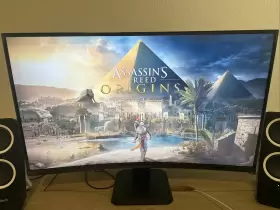


| Brand | GIGABYTE |
|---|---|
| Manufacturer Part Number | G27QCA |
| Part Type | MONITOR |
| UPC | 889523025314 |
| Screen Size | 27 IN |
| Brightness | 250 CD/M2 |
| Response Time | 1 MS |
| Refresh Rate | 165 HZ |
| Video Inputs | HDMI |
| Color | BLACK |
| Most Suitable For | GAMING |
| Display Type | LED BACKLIGHT |
| Maximum Resolution | 2560 X 1440 |
| Item Height | 9.80 IN |
| Contrast Ratio | 4000 |
Review GIGABYTE Inch Curved Qhd Led Gaming Monitor
The Gigabyte G27QC is an immersive 27-inch Curved QHD (2560 x 1440) LED Gaming Monitor that offers an exceptional viewing experience for both gaming and professional use. This monitor features a 1500R curvature, which wraps around the user's field of view, creating a more comfortable and natural viewing experience.
The Gigabyte G27QC boasts a Fast IPS panel with a 1ms (MPRT) response time, ensuring smooth and lag-free visuals, even during fast-paced gaming sessions. The monitor also supports a 144Hz refresh rate, ensuring seamless and fluid motion, reducing motion blur and ghosting.
The monitor features HDR (High Dynamic Range) technology, which enhances the overall visual experience by providing a wider color gamut, increased contrast, and brighter highlights. This results in more lifelike and vibrant images, making games and videos more immersive.
The Gigabyte G27QC is equipped with a variety of gaming-centric features, such as a built-in 2W stereo speaker system, customizable on-screen display (OSD) settings, and an adjustable stand that allows for height, tilt, and swivel adjustments. The monitor also supports AMD FreeSync technology, which eliminates screen tearing and stuttering, ensuring a smooth and lag-free gaming experience.
The monitor's sleek and modern design is complemented by its thin bezel, which provides an almost borderless viewing experience, making multiple monitor setups more aesthetically pleasing. The monitor also comes with a displayHDR 400 certification, ensuring that it meets HDR's strict performance standards.
In summary, the Gigabyte G27QC is a high-performance gaming monitor that offers a curved QHD display, fast response time, and HDR technology for a more immersive and lifelike viewing experience. Its gaming-centric features, such as FreeSync technology, customizable OSD settings, and built-in speakers, make it an excellent choice for gamers and professionals alike.
Pros of buying Gigabyte G27QC:1. QHD resolution (2560x1440 pixels) provides a sharp and clear image with plenty of detail.
2. 144Hz refresh rate ensures smooth and responsive gameplay, reducing lag and stuttering.
3. Curved design enhances immersion and reduces eye strain during extended gaming sessions.
4. Built-in speakers provide decent audio quality, although dedicated gaming headphones may still be preferred.
5. Freesync technology ensures smooth and tear-free gameplay with compatible GPUs.
Cons of buying Gigabyte G27QC:1. The monitor's contrast ratio is not as high as some other gaming monitors in its price range.
2. The monitor's stand does not offer much adjustability, limiting positioning options.
3. The monitor does not have a USB-C port for easy connectivity with modern laptops.
Ending conclusion:The Gigabyte G27QC is a solid gaming monitor that offers a sharp and clear QHD resolution, a smooth 144Hz refresh rate, and a curved design for enhanced immersion. While it has some limitations, such as a limited stand adjustability and a lower contrast ratio compared to some other monitors in its price range, it still provides a great gaming experience for its price point. If you're looking for a high-quality QHD gaming monitor with a 144Hz refresh rate and a curved design, the Gigabyte G27QC is a great option to consider.
Recommendation:If you're in the market for a QHD gaming monitor with a 144Hz refresh rate and a curved design, the Gigabyte G27QC is a strong contender. It offers a great balance of performance, features, and price, making it a solid choice for most gamers. However, if you're looking for a monitor with more adjustability or a higher contrast ratio, you may want to explore other options. Ultimately, the best monitor for you depends on your specific needs and preferences, so be sure to do your research and choose the one that best fits your gaming needs.
Details:
Has a small stuck pixel green which can most likely be fixed. Only used 1 month. But otherwise in perfect condition, still has manufacturers tape on the screen.
specifications monitorpug:
- brand: Gigabyte
- mpn: G27qca
- part type: Monitor
- upc: 889523025314
- screen size: 27 In
- brightness: 250 Cd/m2
- response time: 1 Ms
- refresh rate: 165 Hz
- video inputs: Hdmi
- color: Black
- most suitable for: Gaming
- display type: Led Backlight
- maximum resolution: 2560 X 1440
- item height: 9.80 In
- contrast ratio: 4000
general monitorpug:
- category: Computers > Computers/tablets Networking > Monitors, Projectors Accs
payments monitorpug:
- wallet: apple-pay
- credit card: visa
returns monitorpug:
- policy: no returns
seller monitorpug:
- # reviews: 107
- city: wood land hills, california
- rating: 100.0%
shipping monitorpug:
- class: standard
- transit: 6-11 days
- carrier: usps
- type: calculated
- service: usps ground advantage
offer monitorpug:
- sold #: 31
- availability: in stock
- options: ship-to-home
- in stock #: 5
- started: april 4, 2024
- prices: $36.68–$189.00
- item condition:
- Used
- For parts or not working
Similar Items:
- Gigabyte G34wqcasa G34wqc A-sa 34 Inch 144hz Curved Gaming Monitor 3440 X 1440 Va For Parts Comes with original stand, box and power cords. PS for parts. Gigabyte G34WQC a-SA 34 144HZ curved gaming monitor, 3440 x 1440 VA...(January 24th, 2024)
- Gigabyte Fo48u Aorus 48 Inch 4k Oled 3840x2160 120hz Cracked Screen Original box included. Remote and cables are included. See pictures for condition. Screen is cracked and damaged, one corner damaged...(January 24th, 2024)
- Gigabyte Fi32q Aorus 32 Inch Qhd Ips Led Gaming Monitor The 32-INCH screen size and 350 cd/m brightness make it perfect for immersive gaming. Featuring display port and hdmi standard video inputs, the Gigabyte Arius FI32Q is designed for gaming enthusiasts. With a maximum resolution of 2560 x 1440, refresh rate 165 hz, and response time 1 ms, this ...(February 1st, 2024)
- Gigabyte M27q Parts Only 27 Inch 170hz Qhd No Crack Bad Ribbon Cable Board Gen1 Board that connects to ribbons is dead perfect for cracked M27Q replacement screen if you okay with tedious ribbon cable job. Gen 1 panel dead no crack...(February 10th, 2024)
- Gigabyte M32uc 31.5 Inch 4k Uhd Va Led 144hz Curved Gaming Monitor Black I also gamed with it, and its simply amazing. Please do your research on the features of this M32UC monitor do not confuse it for M32U version. I downsized to a smaller Gigabyte monitor instead. This is a highly sought after monitor, since it supposedly uses the same VA panel as some of Samsung ...(February 10th, 2024)
- Gigabyte M34wq-sa M34wq 34 Inch 144hz Ultrawide Ips Gaming Monitor 3440x1440 Speaker Type C Please see pictures. Pre-owned but in great condition. Ship to lower 48 states only...(March 2nd, 2024)
- Gigabyte Fv43u Aorus 43 Inch Monitor Parts Screen is destroyed. Shipping will drop to less then 50$ usually. Turns on but the power button seems to be broken off board. No stand, cables or original box will strip the boards for cheaper shipping, if stripped, you'll get every board, internal cable and screws...(March 11th, 2024)
- Gigabyte Fi32u Aorus 32 Inch 4k Uhd Ips Led Gaming Monitor Gaming on a t.v...(March 23rd, 2024)
- Gigabyte M27u 27 Inch 4k 160hz Ips Gaming Monitor Hdr Freesync 1ms Response Time Color accuracy: 10-BIT color / 95% DCI-P3 129% scrub versa 600. Resolution panel: 27 3840X2160 ss UPS display. Excellent condition. Works perfectly. Refresh rate response: 160HZ rate, 1MS Mort response time. Connectivity: 2x hdmi 2.1, 1x display port 1.4, 1 x USB type-c alternate mode; upstream ...(April 11th, 2024)
- Gigabyte G32qc-sa G32qc 32 Inch Hdr Curved Qhd Freesyncpremiumpro Monitor Tested working The Gigabyte G32QC is a 32-INCH VA gaming monitor with qhd resolution of 2560 x 1440 pixels, 165HZ refresh rate, and 1MS response time. It has 1 display port and 2 hdmi video inputs, a headphone jack, is tillable height adjustable. Power cable, USB cable to connect computer for software updates ...(April 15th, 2024)
- Gigabyte M32q 32 Inch Qhd Ips 165hz Lcd Monitor This item is a Gigabyte 32 M32Q qhd UPS 165HZ LCD monitor. This item is pre-owned but in very good condition. It has the stand in box, it never been used as I had on a wall mount. Comes with the power cable and I will throw in either a hdmi or game port if you want it...(April 18th, 2024)
