- Used Computers Monitors Deals
- sku: 7576585673357651
- DELL HJ0FY
HJ0FY DELL Xps Laptop Motherboard Ram
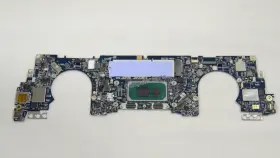
| Brand | DELL |
|---|---|
| Manufacturer Part Number | HJ0FY |
| Part Type | LAPTOP |
Review DELL Xps Laptop Motherboard 8gb Ram
The Dell HJ0FY XPS 13 laptop motherboard is a high-performance solution designed for the latest XPS 13 models featuring the Intel Core i7-1165G7 processor. This motherboard is a perfect fit for those seeking to upgrade or replace their existing motherboard in their XPS 13 laptop.
The Intel Core i7-1165G7 processor is a powerful 4-core, 8-thread chip clocked at 2.8 GHz base frequency and 4.7 GHz max Turbo Boost frequency. It's built on Intel's Tiger Lake architecture, which offers significant improvements in performance and power efficiency. This processor is capable of handling demanding tasks with ease, making it an excellent choice for multitasking, video editing, and 3D rendering.
The motherboard comes with 8GB of DDR4 3200MHz SODIMM RAM, which is soldered onto the board. The memory is expandable, allowing you to add additional RAM modules if needed to increase the total capacity. The motherboard also features two SO-DIMM slots, providing flexibility for future upgrades.
The Dell HJ0FY XPS 13 motherboard supports Intel UHD Graphics, which delivers impressive graphics performance for everyday use, multimedia, and casual gaming. It also features a Thunderbolt 4 controller, which offers fast data transfer speeds and supports DisplayPort and Power Delivery. This versatile port can be used to connect multiple displays, external storage devices, and even charge your laptop.
Additionally, this motherboard includes an M.2 2280 SSD slot, allowing you to install a high-speed solid-state drive for faster boot times and application loading. The motherboard also supports Wi-Fi 6 (802.11ax) and Bluetooth 5.1, ensuring seamless connectivity to the latest wireless devices.
The Dell HJ0FY XPS 13 motherboard is designed with a sleek and compact form factor, making it a great fit for the XPS 13's ultraportable design. It's built with high-quality components and is tested to ensure compatibility and reliability. The motherboard also comes with a comprehensive set of documentation and installation guides to make the upgrade process as smooth as possible.
In conclusion, the Dell HJ0FY XPS 13 motherboard is an excellent upgrade option for those seeking improved performance, expanded memory, and faster connectivity for their XPS 13 laptop. With its powerful Intel Core i7-1165G7 processor, 8GB of DDR4 RAM, Intel UHD Graphics, Thunderbolt 4 controller, and support for Wi-Fi 6 and Bluetooth 5.1, this motherboard is a must-have for power users and multitaskers.
I. Introduction
The Dell XPS 13 laptop is a popular choice for professionals and power users due to its sleek design, impressive performance, and high-quality display. One way to upgrade the performance of this laptop is by replacing its motherboard with a new one that features an Intel Core i7-1165g7 processor and 8GB of RAM. In this analysis, we will discuss the pros and cons of buying a Dell XPS 13 laptop motherboard with the mentioned specifications.
II. Pros1. Enhanced Performance: The Intel Core i7-1165g7 processor is a powerful and efficient chip that can significantly improve the laptop's overall performance. It has four cores and eight threads, which can handle multiple tasks simultaneously, making it ideal for multitasking, video editing, and other demanding applications.
2. Increased RAM Capacity: The 8GB of RAM included in the motherboard upgrade is a significant improvement over the standard configuration of the Dell XPS 13. With more RAM, the laptop can run more applications at once and switch between them more quickly, enhancing the user experience.
3. Future-Proofing: Upgrading the motherboard of a laptop can extend its life and make it more future-proof. By installing a newer processor and more RAM, the laptop can run the latest software and applications efficiently and for a more extended period.
4. Cost-Effective: Replacing the motherboard is often a more cost-effective solution than purchasing a new laptop altogether, especially for those who already own an XPS 13 and are satisfied with its design and features.
III. Cons1. Complex Process: Upgrading the motherboard of a laptop is a complex process that requires technical knowledge and experience. It involves removing the laptop's backcover, disconnecting various components, and carefully installing the new motherboard. Additionally, it may require the installation of new drivers and updates.
2. Potential Compatibility Issues: When upgrading the motherboard, there is a risk of compatibility issues with other components of the laptop, such as the battery, display, or wireless card. These issues can lead to various problems, such as boot loops, system crashes, or a failure to recognize certain peripherals.
3. Risk of Damage: The motherboard upgrade process involves handling delicate components and working in a confined space. There is a risk of accidentally damaging the motherboard, other components, or the laptop itself during the installation process.
4. Cost: While upgrading the motherboard may be cost-effective compared to purchasing a new laptop, it still requires an upfront investment. The cost of the motherboard, installation, and any necessary tools and components can add up, making it a significant expense.
IV. ConclusionThe decision to buy a Dell XPS 13 laptop motherboard with an Intel Core i7-1165g7 processor and 8GB of RAM depends on several factors, including the user's technical expertise, budget, and the condition of their current laptop. The advantages of this upgrade include enhanced performance, increased RAM capacity, future-proofing, and cost-effectiveness. However, there are also disadvantages, such as the complex installation process, potential compatibility issues, the risk of damage, and the cost of the upgrade.
If you are confident in your technical abilities and willing to take on the challenge of upgrading the motherboard yourself, this upgrade can significantly improve the performance and longevity of your Dell XPS 13 laptop. However, if you prefer a more straightforward solution or are not comfortable performing the upgrade yourself, it may be more convenient and cost-effective to purchase a new laptop with similar specifications.
V. RecommendationIf you decide to go ahead with the motherboard upgrade, make sure to thoroughly research the process and gather all the necessary tools, components, and drivers before starting the installation. You can find installation guides and tutorials online, and consider seeking the help of a professional if you are unsure about any steps in the process. Additionally, ensure that the new motherboard is compatible with your laptop's other components and that you have a backup of your data in case of any issues during the upgrade.
Details:
Brand Dell, mpn HJ0FY, condition open box. No accessories, cables, manuals, etc included, unless stated otherwise in the listings. Item may show signs from previous installation. Assay,paw,Bk,i7,8g,1650,OLED HJ0FY Dell xps 13 laptop motherboard I7-1165G7 8gb ram HJ0FY.
For part listings: all parts are pulled from tested working units, unless stated otherwise in the listing. New: 100%-90%. Each condition has a range of battery health percentages. Listing is for the item only.
For battery listings: battery conditions: all batteries are pulled from tested systems.
specifications monitorpug:
- brand: Dell
- mpn: Hj0fy
- part type: Laptop
returns monitorpug:
- policy: returns accepted
- method: money back
- paid by: seller
- time: 30 days
seller monitorpug:
- # reviews: 156485
- city: solon, ohio
- rating: 98.3%
offer monitorpug:
- in stock #: 2
- availability: in stock
- prices: $219.98–$617.36
- item condition:
- Open box
- Used
- started: march 2, 2025
- sold #: 19
- options: ship-to-home
general monitorpug:
- category: Computers > Computers/tablets Networking > Monitors, Projectors Accs
shipping monitorpug:
- class: standard, expedited, one-day
- transit: 4-9 days
- carrier: usps, fedex
- service: standard, usps priority mail, fedex express saver, fedex standard overnight
- type: fixed
payments monitorpug:
- credit card: diners-club
- wallet: paypal
- other
Similar Items:
- Dell P22t Chromebook Laptop Charger Included This Dell P22T Chromebook is a great choice for those in need of reliable and high-quality computer. It is compatible with a variety of software programs and will provide smooth streamlined user experience. This computer is perfect for those in need of a budget-friendly option that still delivers ...(February 24th, 2024)
- Dell I75067807slvpus Inspiron 7506 2-in-1 I7-1165g7 16gb Ddr4 Ram 32gb Optane I7506-7958slv-pus Accessories: may be missing some accessories that are not needed for the functionality of product. May be missing manuals and/or software. Office supplies. Product specifications. Tools hardware. The customer must return the product to USA ship-to address listed on order, and only then will save ...(August 16th, 2024)
