- Used Computers Monitors Deals
- sku: 6509717855112502
- LG LG-27GP83-B
LG-27GP83-B LG Ultragear Qhd Nano Ips Hdr Monitor Sync Stand
| Brand | LG |
|---|---|
| Manufacturer Part Number | LG-27GP83-B |
| Part Type | STAND MONITOR |
| Screen Size | 27 IN |
| Brightness | 400 CD/M |
| Response Time | 1 MS |
| Refresh Rate | 165 HZ |
| Video Inputs | DISPLAYPORT, HDMI STANDARD |
| Color | BLACK |
| Most Suitable For | CASUAL COMPUTING, GRAPHIC DESIGN, GAMING, CCTV |
| Display Type | IPS LCD |
| Maximum Resolution | 2560 X 1440 |
| Contrast Ratio | 1000 |
| Features | HEADPHONE JACK, ADAPTIVE-SYNC, WALL MOUNTABLE, TILTABLE, ANTI-GLARE |
| Product Line | LG ULTRAGEAR |
Review LG Ultragear Inch Qhd Nano Ips 1ms 165hz Hdr Monitor G-sync No Stand
Introducing the LG 27GP83-B UltraGear Nano IPS Monitor, a breathtaking display specifically designed for serious gamers and professionals seeking an immersive visual experience. This 27-inch QHD (Quad High Definition) monitor offers a resolution of 2560 x 1440 pixels, delivering sharp and clear images with stunning detail and visual depth. The array of advanced technologies incorporated into this monitor sets it apart from its competitors in numerous ways.
The LG UltraGear Nano IPS panel boasts a fast 1ms response time, providing minimal lag and ghosting, ensuring that fast-moving images displayed on the screen remain smooth and crisp, allowing for a more responsive gaming experience. Combined with a quick 165Hz refresh rate, this monitor delivers seamless visuals even during the most intense gaming sessions or graphics-intensive tasks, resulting in reduced motion blur and smoother gameplay.
This monitor boasts an impressive HDR (High Dynamic Range) 10 certification, enhancing the visuals displayed by boosting contrast and color accuracy, bringing depth, texture, and improved brightness to your screen. The Nano IPS technology ensures accurate and vibrant colors, covering 99% of the sRGB color gamut. This broad color coverage aligned with a high Delta-E color accuracy rating, makes this monitor perfect for both gaming and professional applications, such as graphic design and video editing.
Furthermore, G-Sync compatibility is integrated into the LG UltraGear Nano IPS monitor, which eliminates screen tearing and stuttering without requiring a separate graphics card. This technology'sDynamic synchronization ensures that the screen's refresh rate remains perfectly in sync with your graphics card to deliver lag-free gameplay for an enhanced gaming experience, especially in fast-paced games.
The sleek, minimalist design of the LG UltraGear Nano IPS Monitor comes with a matching adjustable stand, allowing users to easily tilt, swivel, or adjust the height of their monitor for maximum comfort and ergonomics. This 27-inch monitor is not only an incredible gaming accessory but also a stylish addition to any office setup.
In summary, the LG UltraGear Nano IPS Monitor, model 27GP83-B, offers a stunning visual experience for gaming or professional use with its fast 1ms response time, 165Hz refresh rate, HDR 10 certification, Nano IPS technology, and G-Sync compatibility. This advanced display also features an adjustable stand and minimalist design that is both modern and functional.
A Comprehensive Analysis of the LG 27GP83-B UltraGear QHD Nano IPS 1ms 165Hz HDR Monitor with G-Sync: Pros, Cons, and Recommendation
Introduction:The LG 27GP83-B UltraGear monitor is a high-performance display aimed at avid gamers and professional graphic designers. guaranteeing an immersive and smooth visual experience. In this analysis, we'll explore the primary features, as well as the advantages and disadvantages, to help you decide if this LG monitor is the right choice for your needs.
PROS:1. QHD (Quad High Definition) Resolution (2560x1440): Provides an impressive pixel density for crisp and sharp visuals suitable for gaming and professional applications.
2. Nano IPS Panel: Offers wide viewing angles, excellent color accuracy, and superior color depth.
3. 1ms Response Time: Minimizes ghosting and smearing effects, ensuring fast-paced gaming experiences are smooth and responsive.
4. 165Hz Refresh Rate: Delivers a buttery-smooth flicker-free gaming experience with minimal lag.
5. HDR (High Dynamic Range) Support: Enhances the visual experience by displaying a greater range of brightness and color levels.
6. G-Sync Technology: Eliminates screen tearing and stutter, providing a seamless visual experience making it perfect for playing demanding games at high frame rates.
7. Adjustable Stand: Provides ergonomic adjustment functions, enabling you to fine-tune the monitor's tilt, swivel, height, and pivot to create a comfortable viewing experience.
8. DisplayPort and HDMI ports: Supports multiple connection options for various devices.
Cons:1. Price: The LG 27GP83-B UltraGear monitor falls into the premium price range, which may not be affordable for budget-conscious users.
2. No Thunderbolt 3 Port: Lacks the ability to connect high-speed peripherals such as external graphics cards or docking stations directly to the monitor.
3. Power Consumption: This high-performance display may consume more power than standard monitors, leading to higher electricity bills.
Conclusion:The LG 27GP83-B UltraGear QHD Nano IPS 1ms 165Hz HDR monitor with G-Sync offers exceptional visual performance for gaming and professional applications. With its QHD resolution, Nano IPS panel, fast response time, high refresh rate, HDR support, adjustable stand, and G-Sync technology, this monitor delivers a next-level visual experience. Although it comes with a premium price tag, for those who can afford it, the LG 27GP83-B UltraGear monitor is an excellent investment for an immersive and responsive computing environment.
Recommendation:If the LG 27GP83-B UltraGear monitor fits within your budget and meets your specific requirements, we highly recommend it as a top choice for a high-performance gaming or professional display. However, if the price point seems too high for you, consider exploring other monitors within your budget that offer similar features. Alternatively, if the need for HDR is not a priority, consider monitors with similar specifications without HDR support, which typically have more affordable price points.
Details:
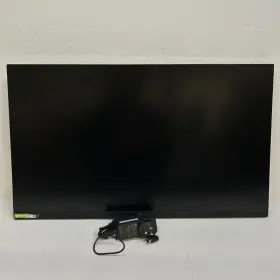
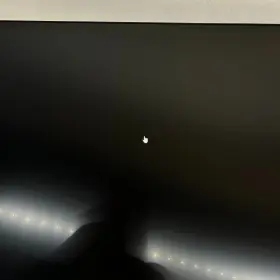
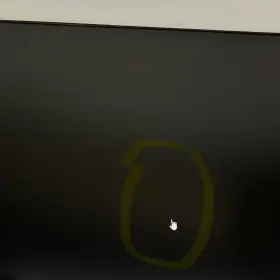
Monitor stand is not included. Overall in good condition. Comes with a monitor and power supply adapter only. Condition notes: there are minor scratches that hardly visible when the monitor is turned on and in use.
specifications monitorpug:
- brand: Lg
- mpn: Lg-27gp83-b
- part type: Stand Monitor
- screen size: 27 In
- brightness: 400 Cd/m
- response time: 1 Ms
- refresh rate: 165 Hz
- video inputs: Displayport, Hdmi Standard
- color: Black
- most suitable for: Casual Computing, Graphic Design, Gaming, Cctv
- display type: Ips Lcd
- maximum resolution: 2560 X 1440
- contrast ratio: 1000
- features: Headphone Jack, Adaptive-sync, Wall Mountable, Tiltable, Anti-glare
- product line: Lg Ultragear
payments monitorpug:
- credit card: diners-club
- other
- wallet: google-pay
seller monitorpug:
- # reviews: 27514
- rating: 99.1%
- city: la habra, california
general monitorpug:
- category: Computers > Computers/tablets Networking > Monitors, Projectors Accs
shipping monitorpug:
- transit: 4-9 days
- class: standard
- carrier: fedex
- type: fixed
- service: standard, fedex ground or fedex home delivery
offer monitorpug:
- prices: $25.99–$127.99
- item condition:
- Used
- New
- Excellent - Refurbished
- Open box
- in stock #: 5
- options: ship-to-home
- availability: in stock
- started: january 7, 2025
- sold #: 27
returns monitorpug:
- time: 30 days
- paid by: seller
- policy: returns accepted
- method: money back
Similar Items:
- Lg 32un550-w 32ftft Uhd 4k Amd Freesync Monitor With Built-in Speakers Pristine 32'' HUD 4k AMD free sync monitor 32UN550-W. See amazing responsiveness when multitasking with a VA display. At 31 and 3840 x 2160 resolution, LG's HUD 4k display features great color, contrast, clarity, detail responsiveness. 32 HUD 3840 x 2160. Its a clear vision for productivity, play and ...(January 22nd, 2024)
- Lg 24qp500b 24qp500-b 24 Inch Qhd 1440p Ips Display Monitor 75 Hz Amd Freesync Black Comes with stand and power cord. Used in great condition. Works perfect with no issues...(January 22nd, 2024)
- Lg 27gp83b-b 27gp83-b 27ftft Ultragear Qhd Nano Ips 1ms 165hz Hdr Monitor Cracked Screen Only screen included. Powers on but screen is cracked...(January 22nd, 2024)
- Lg 32gk650f-b Qhd Gaming Monitor 144 Hz Great condition lightly used. Lg qhd gaming monitor 32GK650F-B 144 hz. Condition is like new. Brand new dp power cord included...(January 22nd, 2024)
- Lg 27ul650-w.aus 27ul650 27 Inch Ips Led 4k Uhd Monitor Black No Stand The monitor features a fast response time of 5 ms and refresh rate 60 hz, making it perfect for casual computing entertainment. Experience stunning visuals with the Lg 27UL650 27 ips led 4k HUD monitor. With a brightness of 350 cd/m and contrast ratio 1000:1, every detail is crystal clear colors are...(January 23rd, 2024)
- Lg 32gq950-b.aus Ultragear 32gq950-b 32 Inch 4k Uhd Ips Led Monitor Doesn include in the box but have all original cables and accessories. Works perfectly...(January 23rd, 2024)
- Lg 24bk750y-b 24 Inch 1080 Ips 5ms Dvi hdmi displayport usb Led Monitor Screen Div/hdmi/displayport/USB led. Join us on social media to follow our journey Lg 24BK750Y-B...(January 23rd, 2024)
- Lg 27gn800-b Ultragear 27 Inch Wqhd 2560x1440 144hz 1ms Lcd Ips Gaming Monitor Part #: Lg 27GN800-B for sale...(January 24th, 2024)
- Lg 27gl83a-b 27 In Widescreen Qhd Ips Lcd Monitor With a 27 inch screen size and maximum resolution of 2560 x 1440, it provides clear detailed display. This Lg 27GL83A-B monitor is perfect for games who demand high-quality visuals. It also features adaptive-sync technology, ensuring smooth and tear-free game play. It is in good condition and works ...(January 25th, 2024)
- Lg 27gp750-b 27 Ultragear Fhd 1920 X 1080 Ips Gaming Monitor Lightly Used Part #: Lg 27GP750-B for sale...(January 25th, 2024)
- Lg E2050tsn Flatron E2050t-sn Led Lcd Monitor Power Supply And Cables Included Shipping is ups ground. The photos you see are of the exact item purchasing or offering on. The power cable and connectivity are included as is the Lg software/drivers. Lg flatiron E2050T-SN led lcd monitor - power supply and cables included, as of last year, this monitor was tested working as ...(January 26th, 2024)
