- Used Computers Monitors Deals
- sku: 340248787686582
- DELL S3422DW
S3422DW DELL Control Buttons
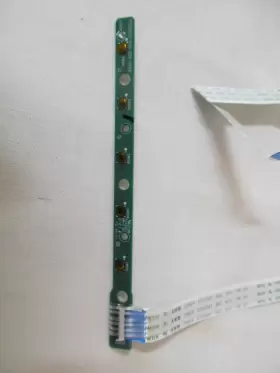
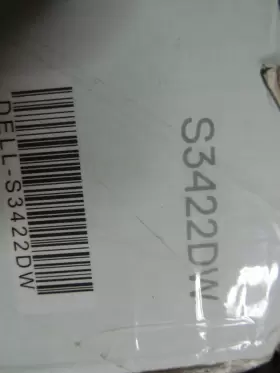
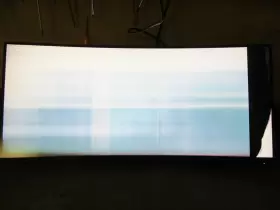
| Brand | DELL |
|---|---|
| Manufacturer Part Number | S3422DW |
| Part Type | CONTROL BUTTON |
| Screen Size | 34 IN |
| Maximum Resolution | 3440 X 1440 |
| Item Length | 9.22 IN |
| Item Width | 31.81 IN |
Review DELL Replacement Parts Control Buttons
The Dell S3422DW Control Buttons, model number 715GB657, are an essential component for managing and navigating your Dell Ultrawide Curved Monitor (S3422DW). This accessory is meticulously designed to blend seamlessly with the monitor's sleek and modern aesthetics, maintaining a harmonious visual unity.
The control buttons are strategically placed on the right side of the monitor, ensuring easy accessibility without obstructing your viewing experience. They include a power button, an OSD (On-Screen Display) button, and three function buttons (F1, F2, and F3). Each button is tactile, providing a satisfying click to confirm your input, offering a sense of control and interaction.
The power button, as the name suggests, turns your monitor on and off with a single press. The OSD button, on the other hand, opens the On-Screen Display menu, allowing you to adjust various settings such as brightness, contrast, and color temperature to suit your preference and environment.
Function buttons F1, F2, and F3 serve as shortcuts to frequently used OSD settings, saving you time and effort. For instance, you can assign F1 to adjust the brightness, F2 to control the volume, and F3 to switch input sources, among other possibilities. The customizability of these function buttons allows you to tailor the monitor's settings to your personal requirements.
In conclusion, the Dell S3422DW Control Buttons 715GB657 are an essential part of the Dell Ultrawide Curved Monitor experience. They provide a convenient and straightforward means of controlling your monitor settings, ensuring a seamless and hassle-free usage experience.
Pros of buying Dell S3422DW Control Buttons (715GB657):1. Wide Curved Screen: The ultra-wide curved screen offers an immersive viewing experience, making it ideal for multitasking and gaming.
2. High Resolution: With a 3440 x 1440 QHD resolution, the monitor provides sharp and detailed images.
3. High Refresh Rate: The 144Hz refresh rate ensures smooth visuals and reduces motion blur in fast-paced games.
4. Adjustable Stand: The monitor's stand allows for tilt, swivel, and height adjustments, providing comfort and flexibility.
5. USB-C Port: The USB-C port offers data transfer, charging, and video output, making it convenient for connecting to various devices.
Cons of buying Dell S3422DW Control Buttons (715GB657):1. Price: The monitor is relatively expensive compared to other models with similar specifications.
2. Limited HDR Support: While the monitor has HDR capabilities, it only supports HDR10, which may not provide the best HDR experience compared to monitors with wider HDR support.
3. Lack of Built-in Speakers: The monitor does not have built-in speakers, which may be a disadvantage for those who prefer to use their monitor for audio output.
Conclusion:The Dell S3422DW Control Buttons (715GB657) is a high-performance ultra-wide curved monitor with a high resolution, high refresh rate, and adjustable stand. While it is relatively expensive, its features make it an excellent choice for gamers and professionals who require a high-quality display for multitasking and creative work. However, potential buyers should consider the lack of built-in speakers and limited HDR support before making a purchase.
Recommendation:If you are looking for a high-performance ultra-wide curved monitor with a QHD resolution, high refresh rate, and adjustable stand, then the Dell S3422DW Control Buttons (715GB657) is a great option to consider. However, if you are on a budget or prefer a monitor with built-in speakers and wider HDR support, you may want to explore other options.
Details:
Please view all pictures as they are part of the. Most have been removed from products with shipping damage.
specifications monitorpug:
- brand: Dell
- mpn: S3422dw
- part type: Control Button
- screen size: 34 In
- maximum resolution: 3440 X 1440
- item length: 9.22 In
- item width: 31.81 In
payments monitorpug:
- wallet: paypal
- credit card: visa
offer monitorpug:
- started: february 5, 2024
- availability: in stock
- best offers: true
- prices: $10.99–$64.75
- item condition:
- Used
- New
- Open box
- sold #: 34
- options: ship-to-home
- in stock #: 5
returns monitorpug:
- policy: no returns
general monitorpug:
- category: Computers > Computers/tablets Networking > Monitors, Projectors Accs
shipping monitorpug:
- carrier: usps
- type: calculated
- class: standard
- service: usps ground advantage
- transit: 3-5 days
seller monitorpug:
- city: washington, pennsylvania
- rating: 100.0%
- # reviews: 826
Similar Items:
- Dell S3222hn Monitor Main Power Supply T Conn Board Replacement Parts Tested They include the main, power supply, Conn boards, the monitor that they were removed from had a cracked screen was tested and still powers up with working boards. You are looking to purchase a genuine set of 3 circuit boards from Dell S3222HN curved monitor...(February 3rd, 2024)
- Dell 2707wfpc 27 Inch Monitor Lcd With Stand Parts Only See pictures. Shipping carriers include USPS and FedEx. Selling as is for parts. Shipping handling...(February 8th, 2024)
- Dell S2722qc As Is Parts Only 27 Inch Monitor Usb-c 4k Uhd 3840 X 2160 60hz Stand included. Broken screen. As is for parts...(March 7th, 2024)
- Dell Dell-p2423de P2423de Monitor Replacement Main Board Used Tested Dell P2423DE monitor replacement main board - used tested...(April 4th, 2024)
- Dell Up3218k Ultrasharp 32 Inch 8k Uhd Ips Led Monitor Broken Screen For Parts Broken, for parts Dell UP3218K...(May 21st, 2024)
- Dell E2422hn 24 Inch Full Hd Ips Led Monitor Black For Parts Therefor, it is being sold for parts or not working. Up for sale today is a Dell E2422HN monitor that has busted screen...(May 25th, 2024)
- Dell 884116388609 22 Inch U2211ht Ultrasharp Lcd Monitor For Parts Only Part #: Dell U2211HT for sale...(July 21st, 2024)
- Dell 9420 Latitude Screen Replacement 14 Inch Lcd Grade B May show minimal wear and tear from normal use. Certified quality: tech tested, certified, and warrantied for your peace of mind. If it is not listed, does come with. This Dell latitude 9420 screen replacement is a 14-INCH LCD panel designed for seamless installation in laptops. Item contains the ...(March 7th, 2025)
- Dell E1609wc 15 Inch Lcd Monitor Computer Screen Untested For Parts No Cords I will try to offer combined discounted shipping when items are purchased on the same day. If there is something in particular you're looking for, please message me. If it can fit in a box or I make box, probably sell. It is untested, I don't have any cords for it, so I m selling it parts. Feel free...(November 23rd, 2025)
- Dell 6wph1 23.8 Inch Fhd Ips Lcd Screen Panel Replacement Lm238wf1-slk1 30-pin Aio Please see the following for details on program. Aspect ratio. New / open box. Refresh rate. Replacement part for compatible Dell AI systems. Model number. There is no known mfg warranty. LCD screen display panel led back light. LM238WF1-SLK1 manufacturer part number. UPS in-plane switching. Dell ...(December 3rd, 2025)
