- Used Computers Monitors Deals
- sku: 972982217344503
- CIDETTY UP133N01
UP133N01 CIDETTY Screen Laptop Monitor Extender Triple
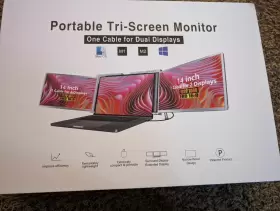
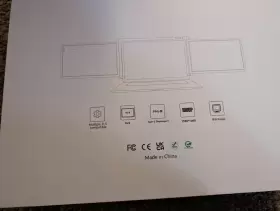
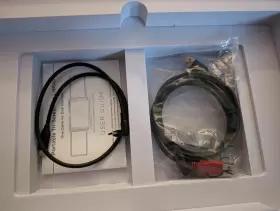
| Brand | CIDETTY |
|---|---|
| Manufacturer Part Number | UP133N01 |
| Part Type | DISPLAY SCREEN LAPTOP MONITOR EXTENDER |
| Screen Size | 14 IN |
| Brightness | 350 CD/M |
| Refresh Rate | 60 HZ |
| Response Time | 3 MS |
| Color | BLACK |
| Video Inputs | USB-C |
| Item Length | 307MM |
| Most Suitable For | CASUAL COMPUTING, CCTV, GAMING, GRAPHIC DESIGN |
| Aspect Ratio | 16 |
| Display Color | 1.07B 10BIT |
| Ntsc | 74 |
| Display Type | IPS LCD |
| Energy Star | 5 STARS |
| Maximum Resolution | 1920 X 1080 |
| Contrast Ratio | 1000 |
| Item Height | 9MM |
| Features | PORTABLE |
| Item Width | 208MM |
Review CIDETTY Tri Screen Inch Laptop Monitor Extender Triple Display Portable
The Cidetty UP133N01 Screen 14 Laptop Monitor Extender Triple Display is an innovative solution for expanding your computer's visual capabilities. This device is designed to connect up to three additional monitors to your laptop, allowing you to multitask more efficiently and increase your productivity.
The primary monitor of this triple display extender is a 14-inch Full HD (1920x1080) IPS panel, which offers a wide viewing angle of 178 degrees, ensuring you can see clear and vibrant images from virtually any angle. The panel boasts a high response time of 5ms, reducing ghosting and ensuring smooth motion in fast-paced content.
The two additional monitors that this device supports are VGA or HDMI-compatible, allowing you to use a variety of displays. These monitors can be connected via the included HDMI and VGA cables, providing flexibility and compatibility.
The Cidetty UP133N01 also features a built-in USB 3.0 hub, offering four additional USB ports for connecting peripherals like keyboards, mice, or external storage devices. This ensures that you have ample connectivity options, making it easier to manage your work or entertainment setup.
In terms of setup, the device is easy to use with its plug-and-play functionality. Once connected to your laptop, the triple display will automatically recognize and configure the monitors, saving you time and effort.
The Cidetty UP133N01 Screen 14 Laptop Monitor Extender Triple Display is not only a functional tool but also a stylish addition to your workspace. Its sleek, compact design ensures it won't take up too much space on your desk, while its lightweight build makes it easy to carry around for on-the-go use.
In conclusion, the Cidetty UP133N01 Screen 14 Laptop Monitor Extender Triple Display is a versatile and powerful solution for anyone seeking to expand their laptop's display capabilities. Its Full HD 14-inch primary monitor, compatibility with multiple display types, USB 3.0 hub, and easy setup make it an excellent choice for business professionals, gamers, or anyone who wants to enhance their multitasking abilities.
Pros of buying a CIDETTY UP133N01 screen 14 laptop monitor extender triple display:1. Increased screen area: The triple display setup provides a larger workspace, allowing you to multitask more efficiently by having multiple windows open simultaneously.
2. Improved productivity: By having multiple windows open at once, you can work on multiple tasks simultaneously, saving time and increasing overall productivity.
3. Enhanced ergonomics: The triple display setup can reduce eye strain by allowing you to position each monitor at an optimal viewing angle, reducing the need to constantly switch between windows.
4. Cost-effective: Compared to purchasing three separate monitors, a monitor extender can be a more cost-effective solution for expanding your screen real estate.
Cons of buying a CIDETTY UP133N01 screen 14 laptop monitor extender triple display:1. Limited compatibility: The monitor extender may only work with certain types of laptops and operating systems, so it's important to check compatibility before making a purchase.
2. Potential for lag: Depending on the quality of the monitor extender and the specifications of your laptop, there may be some lag or delay between the two screens, which can be frustrating when working with graphics-intensive applications.
3. Additional cables and setup: The triple display setup will require additional cables and may require some additional setup, which can be time-consuming and potentially complicated.
4. Power consumption: Having three monitors connected to your laptop can increase power consumption, which may require additional power outlets or higher-wattage power adapters.
Conclusion:If you frequently work with multiple windows and applications, a triple display setup can be a great way to increase your productivity and reduce eye strain. However, it's important to consider the potential limitations and downsides, such as compatibility issues, lag, additional setup, and increased power consumption. In general, a monitor extender can be a cost-effective solution for expanding your screen real estate, but it's important to do your research and make sure it's compatible with your laptop and operating system before making a purchase.
Recommendation:If you're considering a triple display setup, I would recommend the CIDETTY UP133N01 screen 14 laptop monitor extender. It offers a large screen area, is cost-effective, and is compatible with a wide range of laptops and operating systems. However, it's important to do your research and make sure it meets your specific needs and requirements before making a purchase.
Details:
Tri screen - 14 laptop monitor extender triple display portable like br condition.
specifications monitorpug:
- brand: Cidetty
- mpn: Up133n01
- part type: Display Screen Laptop Monitor Extender
- screen size: 14 In
- brightness: 350 Cd/m
- refresh rate: 60 Hz
- response time: 3 Ms
- color: Black
- video inputs: Usb-c
- item length: 307mm
- most suitable for: Casual Computing, Cctv, Gaming, Graphic Design
- aspect ratio: 16
- display color: 1.07b 10bit
- ntsc: 74
- display type: Ips Lcd
- energy star: 5 Stars
- maximum resolution: 1920 X 1080
- contrast ratio: 1000
- item height: 9mm
- features: Portable
- item width: 208mm
shipping monitorpug:
- transit: 4-8 days
- class: standard
- carrier: usps
- service: usps ground advantage
- type: calculated
returns monitorpug:
- policy: no returns
general monitorpug:
- category: Computers > Computers/tablets Networking > Monitors, Projectors Accs
payments monitorpug:
- wallet: google-pay
- credit card: mastercard
offer monitorpug:
- options: ship-to-home
- availability: in stock
- started: march 10, 2024
- quantity: 1
- sold #: 33
seller monitorpug:
- rating: 99.2%
- city: cortland, ohio
- # reviews: 186
Similar Items:
- Cidetty 197038946476 P1 Plus 13.3 Inch Portable Dual Monitor For Laptops 13.3ftft-16.5ftft New With a 1920 x 1080 resolution and 60 hz refresh rate, it offers high-quality display experience. No questions asked. Rest assured that you're getting a good deal when purchasing with us. This monitor is portable, making it convenient for on-the-go use. Fast and free shipping you're already ...(May 9th, 2025)
- Cidetty 790758033305 Laptop Screen Extender 14ftft Fhd 1080p Ips Ultra-thin Dual triple Item part number:s. The screen is equipped with blue light filtering and anti-glare technology, ensuring eye protection a more comfortable viewing experience, even during prolonged use. Fast and free shipping you're already purchasing the item. Broad compatibility Cidetty laptop screen extender is ...(July 23rd, 2025)
