- Used Computers Monitors Deals
- sku: 9263174559947693
- UPERFECT UP185DS1
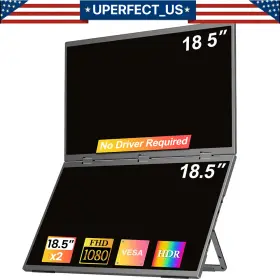
UP185DS1 UPERFECT Delta Monitor Extender Dual Screen Laptop
| Brand | UPERFECT |
|---|---|
| Manufacturer Part Number | UP185DS1 |
| Part Type | MONITOR EXTENDER SCREEN LAPTOP |
| Maximum Resolution | 1920 X 1080 |
| Display Type | IPS LCD |
| Aspect Ratio | 16 |
| Refresh Rate | 60 HZ |
| Features | HEADPHONE JACK, BUILT-IN SPEAKERS |
| Most Suitable For | CASUAL COMPUTING |
| Screen Size | 18.5 IN |
| Country/region Of Manufacture | UNITED STATES |
| Brightness | 400 CD/M |
| Contrast Ratio | 2000 |
| Video Inputs | HDMI MINI, USB-C |
| Color | BLACK |
| Product Line | 18.5 1080P LARGE SIZE PORTABLE MONITOR |
| Energy Star | A |
| Response Time | 3 MS |
| Ec Range | A G |
| Unit Type | UNIT |
| Manufacturer Warranty | 1 YEAR |
Review UPERFECT Delta 18.5 Inch Portable Monitor Extender Dual Screen 1080p For Laptop Ps5
Introducing the Uperfect UP185DS1 Delta 1080p Monitor Extender, an ideal solution for enhancing your laptop or PS5 gaming experience with an additional 18.5-inch 1080p secondary screen. This dual-screen setup offers you a more immersive and productive workspace, allowing you to multitask more efficiently and enjoy your favorite games with a wider field of view.
The UP185DS1 Delta monitor extender is engineered with top-tier components to deliver stunning visuals and seamless connectivity. With a native resolution of 1920 x 1080 pixels, this secondary display offers crisp and clear images, ensuring that your multitasking or gaming sessions remain visually engaging.
This monitor extender is designed with a sleek and stylish housing, making it a perfect addition to any modern workspace or gaming setup. The bezels are narrow, allowing for an almost seamless transition between the primary and secondary screens, providing a more expansive viewing experience.
Connecting the UP185DS1 Delta monitor extender to your laptop or PS5 is a breeze. It comes equipped with a USB-C interface that supports data transfer rates of up to 40Gbps and video resolutions of up to 4K. This means that you can easily connect your laptop or PS5 to the extender using a single cable, eliminating the need for additional cables or complex setup processes.
The UP185DS1 Delta monitor extender also features built-in speakers, offering rich and clear audio to complement your visual experience. The volume can be easily controlled using the on-screen display (OSD) menu or the function keys on your laptop or PS5 controller.
The OSD menu offers a range of customization options, allowing you to fine-tune your display settings to suit your preferences. You can adjust the brightness, contrast, and color temperature, among other settings, to optimize your viewing experience based on your environment and personal preferences.
The UP185DS1 Delta monitor extender also comes with a built-in KVM switch, which allows you to control multiple computers using a single set of peripherals. This is particularly useful for professionals who need to switch between multiple computers frequently or for gamers who want to use the same keyboard, mouse, and other peripherals for multiple gaming systems.
The UP185DS1 Delta monitor extender is also ergonomically designed, with a height-adjustable stand that allows you to find the perfect viewing angle for your secondary screen. The stand also features a tilt function, allowing you to adjust the angle of the screen for optimal comfort and visual clarity.
In summary, the Uperfect UP185DS1 Delta 1080p Monitor Extender is an excellent investment for anyone looking to enhance their laptop or PS5 experience with a secondary screen. Its sleek design, high-resolution display, seamless connectivity, and customizable settings make it a versatile and indispensable addition to any workspace or gaming setup.
Pros and Cons of buying a UPPERPERF UP185DS1 Delta 18.5 Monitor Extender for a Laptop and PS5
1. **Extended Display:** The UPPERPERF UP185DS1 monitor extender allows you to connect two 1080p screens to your laptop and PS5, providing you with an expanded workspace or gaming experience.
2. **Convenient Design:** Its portable and lightweight design makes it easy to carry around, making it a great option for those who travel frequently or work in multiple locations.
3. **Compatibility:** This monitor extender is compatible with various devices, including laptops, PS5, and other gaming consoles, making it a versatile investment.
4. **Adjustable Angle:** The UP185DS1 comes with adjustable stands, allowing you to set the screens at different angles to suit your viewing preferences.
5. **Plug and Play:** The monitor extender is a plug-and-play device, meaning you don't need to install any software or drivers to use it, saving you time and effort.
6. **Affordable:** The UPPERPERF UP185DS1 monitor extender is relatively affordable, making it an appealing option for those on a budget.
7. **Limited Connectivity:** While the monitor extender supports two screens, it only comes with one HDMI port and one VGA port, which may limit your ability to connect additional devices.
8. **Resolution:** The UP185DS1 supports a maximum resolution of 1080p, which might not be ideal for users who require higher resolutions for their work or gaming needs.
9. **Cable Length:** The length of the cables provided with the monitor extender might not be sufficient for all setups, requiring the use of additional cables or extensions.
10. **Display Quality:** Some users have reported issues with the display quality, including poor color accuracy and uneven brightness levels.
Conclusion:The UPPERPERF UP185DS1 Delta 18.5 Monitor Extender offers a convenient and affordable solution for extending your laptop and PS5 display, with its portable design and compatibility with multiple devices. However, its limited connectivity options, resolution, and display quality may not meet the needs of all users.
Recommendation:If you are looking for a budget-friendly monitor extender for occasional use, the UPPERPERF UP185DS1 could be a suitable option. However, if you require higher resolutions, better display quality, or more connectivity options, you may want to consider investing in a more advanced and expensive monitor extender or multiple external monitors instead.
Details:
If the screen signal is poor or flickers, make sure you are only operating monitor with adapter that came it. User-friendly-design built-in adjustable stand the adjustable stand and the fordable dual-screen design are ergonomic work together to adjust display angle. 360 all-round folding 18.5-inch folding monitor can be folded and adjusted for different angles to meet the needs of screen. 18.5-inch dual portable monitor this dual-screen monitor optimizes the problem of cumbersome wiring.
Create the most ergonomic all-in-one workstation. Two screens stacked from top to bottom aid in users scrolling less, while reducing the range of movements needed eyes and neck. Unlike traditional dual monitors that require tedious driver installations, our innovative design simplifies the process, eliminating errors and complexities. Necessary for cad design architectural drawings are often the kind of with most details.
Support single type-c cable for display power device model. Wide compatibility easy setup this dual-screen is perfectly compatible with windows 7/10/11, Marcos 11.5, and above. Designers need to pay great attention every detail when creating and controlling the quality size. Initial setup requires driver installation.
At the same time, fordable design can also reduce volume, making stacked dual screen easy to put in a backpack and increasing portability. The monitor turns on in the default power save mode. Just connect your devices with a single type-c cable and enjoy seamless dual-screen display. More screen space can make the details clearer and reduce error rate in creation process.
Uperfect delta 18.5 portable monitor extender dual screen 1080p for laptop ps5 2025 - 18.5'' 60hz station max stacked. Rest assured, this driver is completely safe, with no risk to your systems security. If it doesn't, you'll need a type-c to hdmi adapter for signal transmission. Whats in the box.
Discover the game-changing difference with Uperfect first-ever driver-free dual-screen monitor. With other adapters, the voltage may be insufficient. If no signal or power saving mode appears, please switch the type-c cable head to another side and reconnect monitor. If the screen still flickers, please swap hdmi cable to test.
specifications monitorpug:
- brand: Uperfect
- mpn: Up185ds1
- part type: Monitor Extender Screen Laptop
- maximum resolution: 1920 X 1080
- display type: Ips Lcd
- aspect ratio: 16
- refresh rate: 60 Hz
- features: Headphone Jack, Built-in Speakers
- most suitable for: Casual Computing
- screen size: 18.5 In
- country/region of manufacture: United States
- brightness: 400 Cd/m
- contrast ratio: 2000
- video inputs: Hdmi Mini, Usb-c
- color: Black
- product line: 18.5 1080p Large Size Portable Monitor
- energy star: A
- response time: 3 Ms
- ec range: A G
- unit type: Unit
- manufacturer warranty: 1 Year
seller monitorpug:
- # reviews: 3692
- city: brooklyn, new york
- rating: 99.7%
payments monitorpug:
- credit card: mastercard
- other
- wallet: google-pay
shipping monitorpug:
- type: fixed
- transit: 5-10 days
- class: standard
- service: standard
returns monitorpug:
- time: 60 days
- method: money back
- paid by: seller
- policy: returns accepted
general monitorpug:
- category: Computers > Computers/tablets Networking > Monitors, Projectors Accs
offer monitorpug:
- prices: $229.99–$369.99
- item condition:
- New
- Open box
- Used
- Certified - Refurbished
- best offers: true
- availability: in stock
- started: june 15, 2025
- options: ship-to-home
- sold #: 18
Similar Items:
- Uperfect Ds13302 15.6 Inch Ip Screen Display Portable Monitor Parts only, lcd is cracked...(January 27th, 2024)
- Uperfect 156j01 Used 1920 1080 15.6 Inch Gaming Monitor Portable Travel Compatible model's. 1 x Uperfect 15.6 inch portable monitor, standard hdmi to mini cable, usb-c usb-a 5v 3a power adapter, smart cover, user manual kit. Light leakage, exposure, dead pixels, and light spots in small local areas can basically be used normally, the button/menu is abnormal, but the ...(January 29th, 2024)
- Uperfect 156t03 Used Portable Monitor 15.6inch 1920 1080 Gaming For Ps Xbox Used Uperfect portable monitor 15.6INCH 1920 1080 gaming for ps box important tips. Package, since the product is used, packaging may not be 100% new.if you mind, please consider it before placing an order. Product highlights, Fahd 1920 1080 resolution Dr, ips screen, 178 viewing angles, 2/1 w ...(January 29th, 2024)
- Uperfect 185e02 Used 120hz Monitor 18.5 Inch Gaming Fhd Usb C Portable Touch screen: no. Light leakage, exposure, dead pixels, and light spots in small local areas can basically be used normally, compatible model's laptop. Compatible phone model's. Apple: it supports connection with iPhone, but a lighting to hdmi adapter is needed. Multi-language menu: including ...(January 29th, 2024)
- Uperfect 160c01 16 Inch 2k 2560 1600 Portable Monitor 120hz Cables Folio And Custom Stand The stand makes it easy to rotate the display, and change angle. VR is supported, video over usb-c as well. This monitor has a max resolution of 2560X1600 120HZ. Uperfect 16 2k portable monitor...(February 3rd, 2024)
- Uperfect R15pmt01 Visual Beat Portable Monitor Touch Screen 15.6ftft 1080p Usb-c Hdmi That means we buy the label for you. Please see the pictures and full for more details. Used condition tested for key functions R2/READY resale, comes with exactly whats pictured. Visual beat portable monitor touch screen 15.6'' 1080P usb-c hdmi used lightly, tested working. Any questions...(February 15th, 2024)
- Uperfect 156c10 Used 15.6 Inch 4k Portable Monitor Pc Gaming Ips Laptop Mini Hdmi usb-c The appearance is abnormal/one of the electrical ports damaged, glue overflows, and display screen can be used normally, built-in speakers: speakers provide amazing sound and even more intense entertainment when listening to music, watching movies or playing games. Light leakage, exposure, dead ...(February 27th, 2024)
- Uperfect 133b04 Used 13.3 Inch Portable Monitor External Gaming Usb Usb-c Light leakage, exposure, dead pixels, and light spots in small local areas can basically be used normally, compatible phone model's. Compatible with most smartphone. Apple: it supports connection with iPhone, but a lighting to hdmi adapter is needed. Thanks a lot. The button/menu is abnormal, but ...(March 4th, 2024)
- Uperfect 156e06 Used 15.6 Inch Touchscreen Monitor Usb-c Portable Display 1920 1080 Battery Three in one signal port: hdmi, usb-c. Light leakage, exposure, dead pixels, and light spots in small local areas can basically be used normally, 1 x Uperfect 15.6 inch portable monitor, usb-a to usb-c cable 2 cables, standard hdmi cable, 30W pd power adapter, smart cover, user manual kit. Thanks a ...(March 4th, 2024)
- Uperfect 156a07 Used 4k Portable Monitor 15.6 Inch Gaming Hdmi mini Dp usb-c Light leakage, exposure, dead pixels, and light spots in small local areas can basically be used normally, the appearance is abnormal/one of the electrical ports damaged, glue overflows, and display screen can be used normally, compatible with most smartphone. Specifications, - refresh rate: 60HZ, ...(March 4th, 2024)
- Uperfect 133b06 Used 13.3 Inch Touchscreen Monitor Pc Screen Hdmi Vga Portable Vesa Adjustable stand. Full screen and rounded edges make it looks more textured. The appearance is abnormal/one of the electrical ports damaged, glue overflows, and display screen can be used normally, support long press and right function. Light leakage, exposure, dead pixels, and light spots in small ...(March 4th, 2024)
