- Used Computers Monitors Deals
- sku: 8426485179181673
- ZUMWALT ZUMWALT-S3
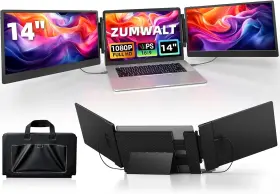
ZUMWALT-S3 ZUMWALT Triple Laptop Screen Extender Fhd Monitor
| Brand | ZUMWALT |
|---|---|
| Manufacturer Part Number | ZUMWALT-S3 |
| Part Type | LAPTOP SCREEN EXTENDER MONITOR |
| Unit Type | UNIT |
| Screen Size | 14 IN |
| Refresh Rate | 60 HZ |
| Maximum Resolution | FHD 1080P |
| Aspect Ratio | 16 |
| Product Line | PORTABLE MONITOR FOR LAPTOP |
Review ZUMWALT Inch Triple Laptop Screen Extender 1080p Fhd Portable Monitor For 16.5 Laptops
Introducing the Zumwalt ZS3-14 Triple Laptop Screen Extender, a revolutionary accessory designed to enhance your laptop experience by expanding your workspace. This innovative device is compatible with 13-inch and 15.6-inch laptops, making it a versatile solution for a wide range of users.
The Zumwalt ZS3-14 is engineered with three 14-inch Full High Definition (FHD) screens, each boasting a 1920x1080 pixel resolution. This high-definition screen resolution provides an exceptional visual experience, allowing you to work on multiple applications simultaneously, edit documents side by side, or enjoy an immersive multimedia experience.
The sleek and lightweight design of the Zumwalt ZS3-14 makes it easy to transport and set up. The screens can be adjusted for optimal viewing angles, allowing you to find the most comfortable position for your work or play. The device is also compatible with most major operating systems, including Windows and MacOS.
The Zumwalt ZS3-14 is equipped with a USB-C hub, enabling you to connect your laptop to the screens using a single cable. This not only simplifies the setup process but also ensures that all your data and power requirements are met through a single connection. The device also comes with built-in speakers, providing you with high-quality audio to complement your visual experience.
The Zumwalt ZS3-14 is designed with energy efficiency in mind, ensuring that it does not consume excessive power. The screens are also coated with an anti-glare finish, reducing eye strain and providing a more comfortable viewing experience, even in bright environments.
In conclusion, the Zumwalt ZS3-14 Triple Laptop Screen Extender is an essential accessory for anyone who requires a larger and more versatile workspace. Its high-definition screens, sleek design, and easy setup make it an ideal solution for professionals, students, and anyone who values productivity and comfort.
Zumwalt Zumwalt-S3 14 Triple Laptop Screen Extender: A Comprehensive Analysis
The Zumwalt Zumwalt-S3 14 Triple Laptop Screen Extender is an intriguing device designed to enhance productivity for laptop users by adding three additional 1080p FHD screens. In this analysis, we will discuss the key advantages and disadvantages of this product to help you make an informed decision.
Advantages:1. Increased Productivity: The primary advantage of using a triple screen setup is the ability to multitask more efficiently. Having multiple screens allows users to manage multiple applications or windows at once, reducing the need to switch between them frequently.
2. Ergonomics: The Zumwalt-S3 reduces the strain on the eyes and neck caused by prolonged usage of a single laptop screen. It allows users to maintain a comfortable posture and view angles by distributing the workload across multiple screens.
3. Versatility: The device is compatible with most 13-16.5 inch laptops, making it a versatile solution for a wide range of users. It also features a lightweight and portable design, making it easy to transport and use on the go.
4. Cost-Effective: Compared to purchasing three separate monitors, the Zumwalt-S3 is a more cost-effective solution for increasing your screen real estate.
Disadvantages:1. Limited Connectivity: The Zumwalt-S3 only supports three laptop connections, meaning it may not be suitable for users who require more than three screens or who need to connect multiple laptops simultaneously.
2. Limited Adjustability: The screens on the Zumwalt-S3 are not adjustable, which may make it difficult for users to find the optimal viewing angle.
3. Power Consumption: The device consumes additional power from the laptop's battery, which may impact battery life, especially when using multiple high-performance applications.
Conclusion:The Zumwalt Zumwalt-S3 14 Triple Laptop Screen Extender offers a cost-effective and convenient solution for increasing productivity by adding three additional screens to a laptop. Its ergonomic design and compatibility with various laptop sizes make it an attractive option for users who require extra screen space. However, its limited connectivity, adjustability, and potential impact on battery life should be carefully considered before making a purchase.
Recommendation:If you're looking for a triple screen setup for your laptop and value portability and cost-effectiveness, the Zumwalt Zumwalt-S3 14 Triple Laptop Screen Extender is an excellent choice. However, if you require more connectivity options, adjustable screens, or don't mind the added expense, you may want to consider purchasing separate monitors instead. Ultimately, the decision depends on your specific needs and preferences.
Details:
Enjoy a wide viewing angle and rich, vibrant colors. Zumwalt laptop screen extender, 14 triple portable monitor for laptop, 1080p fhd extender monitors 13 -16.5 mac/windows/chrome built-in speakers: wide compatibility application: laptop screen extender monitor portable compatible with mac/windows/android/chrome/switch via USB-c/HDMI. Switch between extended/duplicate modes to minimize tab-switching fatigue. This feature ensures you can adjust the angle for optimal viewing while watching movies or giving presentations.
Ultra-slim profile weighs only 4.5lbs for mobile workspace. The perfect simultaneous multi-screen and standalone display solution for laptop users. Note: make sure your laptop has a full-featured USB-c port or an HDMI and USB-a. Triple-screen boost 300% productivity: Zumwalt laptop screen extender expands your to triple screens instantly - view spreadsheets, design tools, and chats simultaneously.
Reducing eye fatigue and enhance your visual experience like never before. Bringing you a clearer and more accurate color reproduction picture. Note: not compatible with mac book air m1/m2/m3 chips, pro 2012 and earlier, 2017 earlier. Perfect for remote workers, home offices, online learning students, meetings, games, designers, coders, programmers, and stock trading financial analysts.
Adjust brightness/volume via side buttons. Plug and play setup: without driver.
specifications monitorpug:
- brand: Zumwalt
- mpn: Zumwalt-s3
- part type: Laptop Screen Extender Monitor
- unit type: Unit
- screen size: 14 In
- refresh rate: 60 Hz
- maximum resolution: Fhd 1080p
- aspect ratio: 16
- product line: Portable Monitor For Laptop
returns monitorpug:
- policy: no returns
offer monitorpug:
- sold #: 22
- started: april 19, 2025
- best offers: true
- availability: in stock
- options: ship-to-home
- in stock #: 2
- prices: $132.38–$139.99
- item condition: New
general monitorpug:
- category: Computers > Computers/tablets Networking > Monitors, Projectors Accs
shipping monitorpug:
- transit: 4-10 days
- class: standard
- type: fixed
- carrier: usps
- service: usps ground advantage
payments monitorpug:
- other
- wallet: paypal
- credit card: diners-club
seller monitorpug:
- rating: 100.0%
- city: renton, washington
- # reviews: 1
Similar Items:
- Zumwalt 705353847189 Laptop Screen Extender 14 Inch Triple Portable Monitor For 1080p Fh Please understand that some factors like weather, high postal traffic, and the performance of shipping companies are outside our control. Reducing eye fatigue and enhance your visual experience like never before. Zumwalt laptop screen extender, 14 triple portable monitor for laptop, 1080P fhd ...(August 17th, 2025)
- Zumwalt 313021689667 Laptop Screen Extender 14 Inch Triple Portable Monitor For 1080p Fh Easy to carry. Key features: 14 triple screen laptop monitor extender. Works with Marcos / windows chrome OS. UPS display, 178 wide viewing angle. Built-in speakers. Full hd 1920 1080 resolution. 300 nits brightness, glossy screen. Condition: brand new factory sealed. Eye care technology. Previous ...(December 12th, 2025)
